Stop the Scroll and Start the Toll with Meta Paid Ads
Why Meta Pay Ads Can Make or Break Your Ad Budget
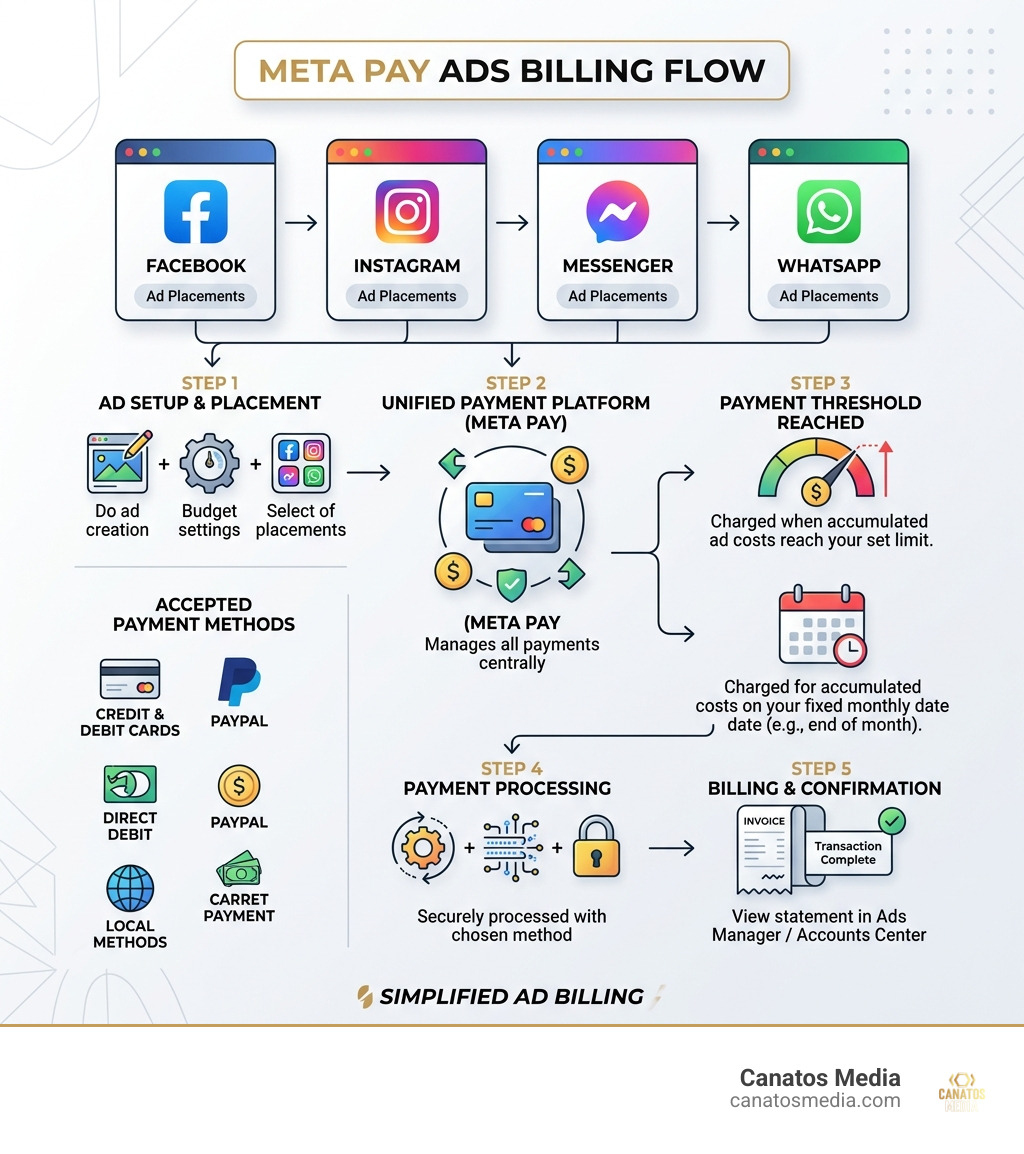
Meta pay ads is the billing system Meta uses to charge you for advertising across Facebook, Instagram, Messenger, and WhatsApp — all managed through a single unified payment platform.
Here is what you need to know at a glance:
| Topic | Quick Answer |
|---|---|
| What is Meta Pay? | Meta’s unified payment platform for ad billing across its apps |
| How does billing work? | Automatic charges at a payment threshold or on your monthly bill date |
| What payment methods are accepted? | Credit/debit cards, PayPal, direct debit, and local methods depending on your country |
| Where do you manage payments? | Meta Ads Manager or Accounts Center |
| What if you see an unknown charge? | Contact your bank, verify with Meta, and dispute if fraudulent |
Every dollar you spend on Meta ads flows through this system. And if you don’t understand how it works, you can end up with surprise charges, disabled accounts, or worse — money wasted on ads that never even ran.
With over 3.58 billion daily active users across Meta’s apps as of December 2025, the platform is one of the most powerful advertising tools on the planet. But that power comes with a billing setup that confuses a lot of business owners.
This guide breaks it all down — simply and clearly.
I’m Nic Canobbio, and through my work leading Canatos Media and overseeing large-scale media and content strategies, I’ve navigated meta pay ads billing — from managing ad spend across multiple campaigns to negotiating deals that depend on clean, uninterrupted ad delivery. That hands-on experience is exactly what shapes the practical guidance you’ll find here.
Decoding Your Bank Statement: What are Meta Pay Ads Charges?
We’ve all been there. You’re sipping your morning coffee in Long Island, scrolling through your business bank statement, and you see it: a charge that looks like a cat walked across a keyboard. Something like METAPAY*ADS or FACEBOOK*ADS followed by a string of numbers.
Before you call the fraud department, let’s decode that jargon. These descriptors are how Meta identifies the money it pulls for your campaigns. Because Meta Platforms, Inc. owns everything from Instagram to WhatsApp, they use a unified billing system. Meta Pay is the platform that handles these transactions.
Usually, the charge includes a “tag” or a phone number. This is meant to help you trace the transaction back to a specific ad account. If you see “METAPAY,” it means the transaction was processed through the unified wallet system. Given that Meta had about 3.58 billion average daily users in late 2025, the sheer volume of transactions they process is staggering. In fact, third-party payment processors like Slash now power about 1% of all Meta ad spend globally.
If you are running a local business in the tri-state area, keeping your statement clean is vital for tax season. If you see a charge you don’t recognize, don’t panic. Sometimes it’s just a pre-authorization “ping” to make sure your card is active, or a delayed charge from a campaign that ended a few days ago. However, if you’re serious about scaling, you need to move from “accidental spender” to “strategic investor.” You can learn more about paid social strategy to ensure every charge on that statement is actually driving ROI.

Step-by-Step: Adding a Payment Method for Meta Pay Ads
Setting up your meta pay ads wallet is the first step toward going live. Meta is quite picky about how you pay, and they’ve been moving toward more secure, verified methods recently.
Here is how we recommend adding your payment method to ensure your ads don’t get paused at the worst possible moment:
- Access the Accounts Centre: On your computer, click your profile picture > Settings & privacy > Settings. From there, navigate to the Accounts Centre.
- Navigate to Meta Pay: Look for the “Meta Pay” or “Payments” section. This is your central hub for everything money-related.
- Add Your Card: Click “Add debit or credit card.” Meta accepts most major players: Amex, Discover, Mastercard, and Visa.
- Set a Default: If you have multiple cards (maybe a backup for when your primary hits its limit), select your preferred card and toggle “Set as default.”
- Verification: Meta might send a small temporary charge to verify the card. Don’t worry, it disappears faster than a viral trend.
If you ever need to swap cards or remove an old one, the process is the same. Just click next to the card and select “Remove card.” For a full list of what’s accepted based on your specific setup, you can check the Accepted payment options for Meta ads page.
Managing Your Unified Wallet
One of the coolest (and sometimes most confusing) things about meta pay ads is that it’s a “unified wallet.” This means the payment method you save for Facebook can also be used for your Instagram ads and even Horizon apps.
This centralized management is great for security. Instead of entering your credit card info into five different apps, you do it once. Meta Pay uses anti-fraud technology and encrypted card storage to keep your data safe. We always suggest our clients in the tri-state area set up a personalized PIN or use biometrics (like FaceID) for their Meta Pay transactions. It adds an extra layer of “no one is spending my money but me.”
Navigating Billing Cycles and Payment Thresholds
Meta doesn’t usually bill you the second your ad starts running. Instead, they use a system of “thresholds” and “bill dates.” Think of it like a utility bill, but for attention.
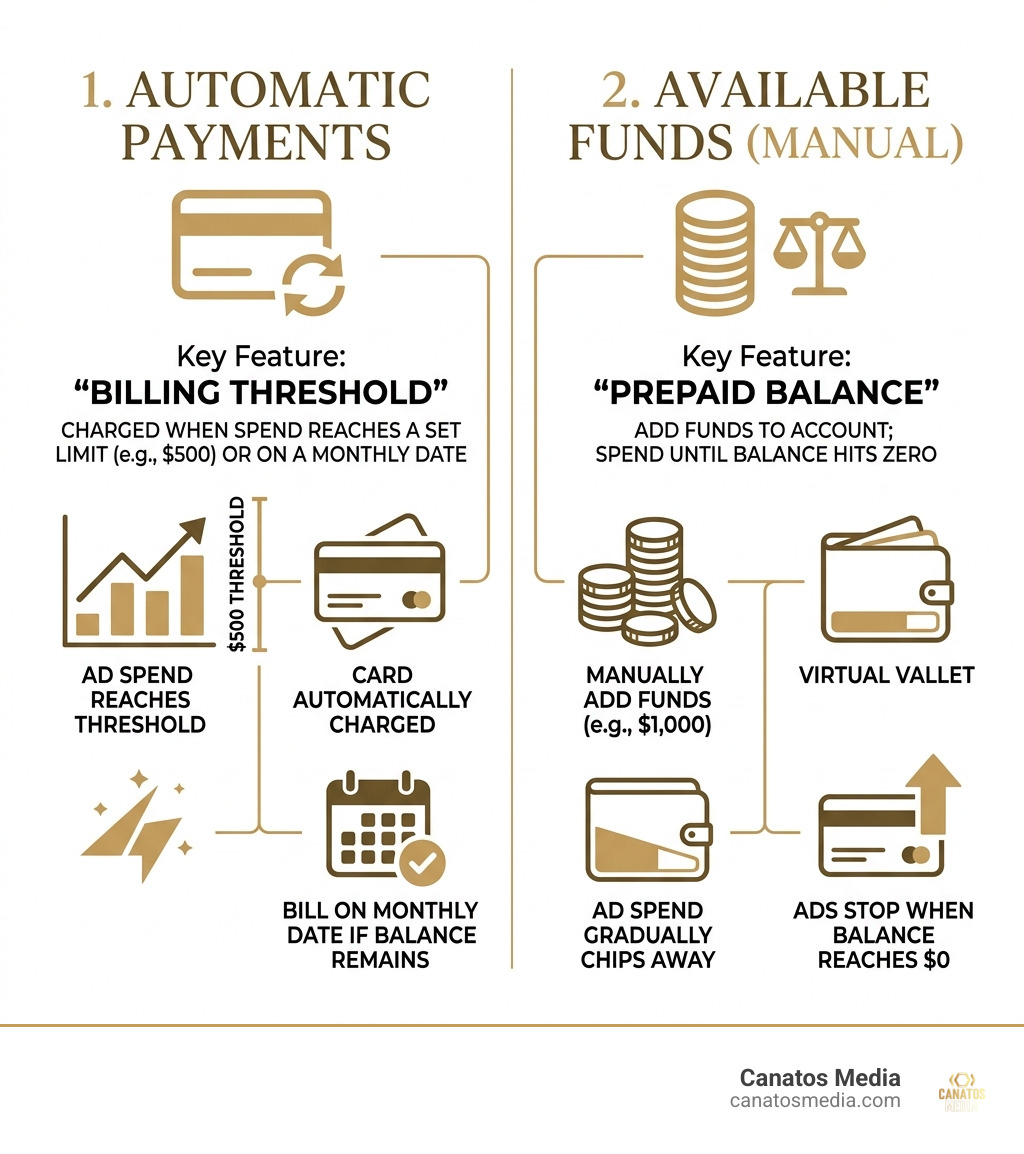
There are two main ways meta pay ads are billed:
- Automatic Payments: This is the most common. Meta gives you a “payment threshold” (e.g., $500). Every time your ad spend reaches $500, Meta charges your card. If you don’t hit that $500 by the end of the month, they charge you on your “monthly bill date” for whatever balance is left.
- Available Funds (Manual): This is like a prepaid phone. You add $1,000 to your account, and Meta slowly chips away at it as your ads run. Once the balance hits zero, your ads stop.
Understanding How Meta Charges for Ads is essential for cash flow management. If you’re a growing business on Long Island, you don’t want five $500 charges hitting your account on the same day if you aren’t prepared for it.
Troubleshooting Failed Meta Pay Ads Payments
Nothing kills a campaign faster than a “Payment Failed” notification. When your meta pay ads payment fails, Meta pauses all your ads immediately. If this happens too often, they might even disable your ad account entirely.
Common reasons for failure include:
- Insufficient Funds: The most obvious one.
- Credit Limit Reached: Your bank might have a daily spending limit.
- Expired Card: You forgot about that new card that came in the mail last month.
- Bank Block: Sometimes banks see a series of charges from “METAPAY” and flag it as suspicious.
If your payment fails, go to your Billing settings in Ads Manager. You can usually click “Pay Now” to retry the charge manually. If that doesn’t work, you might need to contact your bank or report an unauthorized Meta Pay charge if you suspect something is fishy.
Avoiding the 30% Apple Service Fee
This is a big one that many people miss. If you are boosting a post or setting up ads through the Instagram iOS app, Apple takes a 30% service fee on top of your ad spend.
Yes, you read that right. If you want to spend $100 on ads, Apple might charge you an extra $30 just for the privilege of using their app to buy them.
The Pro Tip: Never buy ads through the iOS app. Instead, use a desktop computer and go to adsmanager.facebook.com or instagram.com. By using the web version, you bypass the Apple App Store entirely and keep that 30% in your own pocket. For more details on this, check out the official guide on how to pay for Instagram ads.
Global Payment Options and Policy Changes
The world of meta pay ads is constantly shifting. As of April 2026, Meta has implemented some significant policy changes aimed at reducing fraud. Meta projected that in 2024 alone, about 10% of its revenues ($16 billion!) came from ads for fraudulent or banned goods. To combat this, they are getting much stricter.
For larger advertisers, Meta is moving away from credit cards and mandating monthly invoicing or direct bank debits. This shift requires bank verification, which makes it much harder for scammers to operate. While this might be a headache for those who love their credit card points, it’s a necessary step for platform integrity.
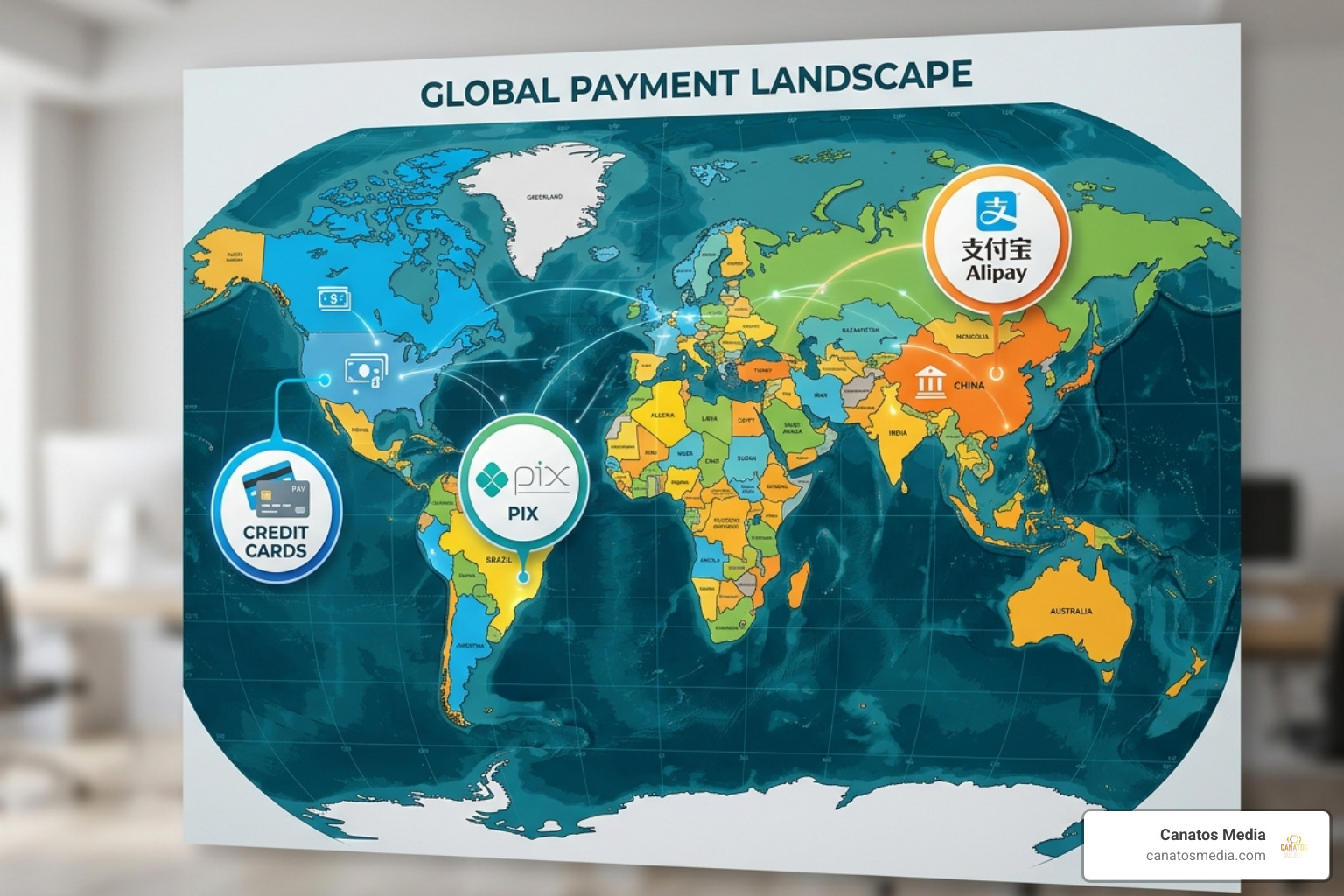
If you are running campaigns internationally from the tri-state area, you’ll also notice that payment methods vary by country. In Brazil, they use Boleto Bancário; in China, it’s Alipay. But for our local partners, the focus remains on secure, verified US-based banking. Staying ahead of these policy shifts is part of how we build an all-in-one marketing funnel that doesn’t get interrupted by technicalities.
Advanced Spending Controls and Receipt Management
We always tell our clients: “Don’t set it and forget it.” Meta gives you several tools to make sure you don’t wake up to a $10,000 bill you didn’t expect.
- Campaign Spending Limits: You can set a cap on a specific campaign. Once it hits that number, it shuts off.
- Account Spending Limits: This is your ultimate safety net. You can tell Meta, “Never charge this account more than $5,000 total.” It’s a great way to sleep better at night.
- Bid Strategies: Instead of just letting Meta spend whatever it wants, you can set “Cost Caps” to ensure you’re only paying what a lead is actually worth to you.
When it comes to the “boring” stuff like taxes, Meta makes it fairly easy to download your receipts. In the Billing & Payments section of Ads Manager, you can see every single charge, the specific ad it was for, and download a PDF for your accountant. This is also where you ensure you are VAT/GST compliant if you’re doing business across borders.
Frequently Asked Questions about Meta Billing
Why do I see a Meta Pay charge I don’t recognize?
Most of the time, this is either a billing threshold being hit or a delayed charge from a previous campaign. However, since Meta projected $16 billion in fraudulent ad revenue recently, it’s worth being cautious. Check your Ads Manager “Billing” section first. If the charge isn’t there, contact your bank and Meta support immediately.
How do I switch from automatic to manual payments?
This is tricky. Usually, the “type” of billing is determined when you first set up the account based on your first payment method. If you start with a credit card, you’re likely on automatic. If you want to switch, you often have to create a new ad account or contact Meta support, though some accounts now allow both.
What happens if my primary payment method fails?
Meta will immediately pause all active ads. They will then attempt to charge your secondary (backup) payment method if you have one. If that fails too, your account will stay paused until the balance is settled. Pro tip: Always have a backup card on file to avoid losing your “algorithm momentum.”
Conclusion
Navigating meta pay ads doesn’t have to be a headache. Whether you’re decoding a confusing bank statement or trying to avoid that pesky 30% Apple fee, the key is staying informed and staying in control.
At Canatos Media, we believe that your ad spend should be an investment, not an expense. We specialize in an integrated strategy that connects cinematic short-form content with high-precision targeting and robust conversion tracking. From the tri-state area to Long Island, we help businesses turn “scrolling” into “sales.”
Ready to stop worrying about billing thresholds and start focusing on growth? Start your professional ad management journey with us today. We’ll handle the “tolls” so you can enjoy the ride.