Why Your LinkedIn Paid Campaign Strategy Is Make or Break for B2B Growth
A strong linkedin paid campaign strategy is the difference between burning budget on bot leads and actually filling your pipeline with decision-makers who can sign contracts.
Here is a quick-start framework to get your LinkedIn ads working:
- Pick the right objective first — Awareness, Consideration, or Conversion — based on where your buyer is in their journey
- Target precisely — Use job title, seniority, company size, and company lists to reach real decision-makers
- Keep audiences under 100,000 — Smaller, tighter audiences reduce junk traffic and bot leads
- Turn off Audience Expansion and LinkedIn Audience Network — These defaults drain budget on irrelevant impressions
- Match your offer to the funnel stage — Cold audiences need value-first content (checklists, webinars), not demo requests
- Use Manual or Cost Cap bidding — Avoid letting LinkedIn’s Maximum Delivery inflate your CPMs unchecked
- Budget at least $5,000/month — LinkedIn reps advise against Lead Gen or Conversion campaigns below this threshold
- Measure pipeline quality, not just clicks — Track qualified lead rate, sales acceptance, and cost per opportunity
LinkedIn has over 1 billion users, and four out of five of them drive business decisions. That is an enormous professional audience. But the platform’s defaults, its auction system, and its ad formats can work against you if you do not know what to watch for.
Many advertisers have spent thousands of dollars — sometimes over $3,000 in a single campaign — and walked away with zero qualified leads. Not because LinkedIn does not work, but because the setup was wrong from the start.
I am Nic Canobbio, founder of Canatos Media, and over two decades of building media strategies and high-stakes partnerships has shown me exactly where a linkedin paid campaign strategy succeeds or stalls. In this guide, I will walk you through the exact steps to run campaigns that actually convert.
Building a Full-Funnel linkedin paid campaign strategy
To succeed on LinkedIn in May 2026, you cannot simply “set and forget” a single ad. B2B buyers are more sophisticated than ever. They require multiple touchpoints before they trust a brand enough to share their contact information. A full-funnel approach ensures you are not just asking for a “marriage” on the first date.

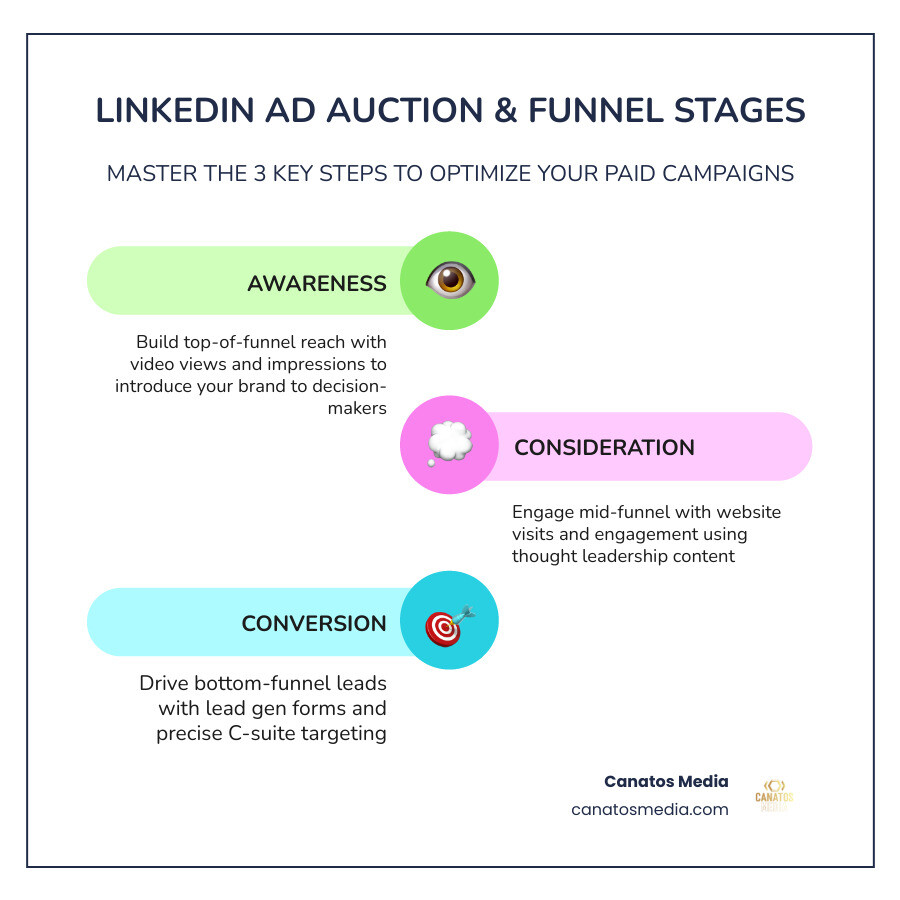
A successful funnel moves a prospect through three distinct stages:
- Awareness: You are introducing your brand to a cold audience. The goal here is reach and “brand recall.” You want them to recognize your name when they see it again.
- Consideration: You are providing value. This is where you drive traffic to your website or encourage engagement with a video. You are proving you understand their pain points.
- Conversion: This is the “ask.” Whether it is a Lead Gen Form for a whitepaper or a website conversion for a demo, you are collecting data to hand off to sales.
For a deeper dive into how social ads work across platforms, check out our guide on Paid Social Media Advertising from Zero to Hero in One Hour.
Comparing LinkedIn Ad Objectives
| Funnel Stage | Recommended Objective | Best Ad Formats | Key Metric |
|---|---|---|---|
| Awareness | Brand Awareness | Video Ads, Single Image | Impressions / Reach |
| Consideration | Website Visits / Engagement | Thought Leader Ads, Document Ads | CTR / Video View Rate |
| Conversion | Lead Generation / Conversions | Lead Gen Forms, Conversation Ads | CPL / Conversion Rate |
Aligning Objectives with High-Ticket B2B Services
When you are selling high-ticket services—like podcast marketing for executives or enterprise software—the “Conversion” objective can be a trap if used too early. High-consideration purchases require high-trust relationships.
According to Ad set setup best practices | LinkedIn Help, selecting the right objective is the foundation of your ad set performance. If you target a Fortune 1000 CEO with a “Book a Demo” ad immediately, you will likely see high costs and low engagement. Instead, align your objective with the “temperature” of the audience. Use Awareness to highlight a common industry problem, then use Consideration to offer a solution-oriented case study.
Selecting Ad Formats for Every Funnel Stage
Choosing the right format is as important as the message itself. In 2026, LinkedIn offers a variety of “media-rich” options:
- Sponsored Content (Single Image & Carousel): The bread and butter of the feed. Carousels are excellent for step-by-step walkthroughs or product comparisons.
- Video Ads: One of LinkedIn’s fastest-growing formats. Keep them under 30 seconds for the best results, and always include captions, as many executives browse on mute.
- Document Ads: A powerhouse for lead gen. Users can read your whitepaper or checklist directly in the feed.
- Thought Leader Ads: These allow you to sponsor a post from a real person’s profile (like a CEO or subject matter expert). They feel more authentic and less like a “corporate” ad.
- Connected TV (CTV): 84% of B2B marketers using CTV ads find them helpful for ROI. These are perfect for high-level brand storytelling at the top of the funnel.
- Sponsored Messaging (Message & Conversation Ads): These land directly in the inbox. LinkedIn has a frequency cap: members usually only receive these once every 45 days.
Precision Targeting for C-Suite and Fortune 1000 Executives
The most powerful feature of LinkedIn is the data. You can target by job title, company size, and even specific company names. However, “with great power comes great responsibility”—or in this case, the risk of over-targeting.

To reach the C-suite in the tri-state area or Long Island, you need a balanced linkedin paid campaign strategy. Start with your Ideal Customer Profile (ICP). If you are looking for Fortune 1000 leaders, do not just rely on job titles. Many executives have “unique” titles that might not fit standard categories.
Instead, use Matched Audiences. This allows you to upload a specific list of target companies (Account-Based Marketing) and then layer on seniority filters like “VP” or “C-level.” You can also leverage Predictive Audiences, which uses LinkedIn’s AI to find users similar to your existing high-value customers.
As noted in Paid Advertising on LinkedIn: A Practitioner’s Guide (2026), the goal is not to make the audience as small as possible, but to make it as coherent as possible.
Avoiding Bot Leads and Audience Expansion Pitfalls
One of the most common ways beginners blow their budget is by leaving default settings toggled “on.”
- Audience Expansion: This allows LinkedIn to show your ads to people “similar” to your target. In theory, it sounds great. In reality, it often pulls in low-quality leads and bots. Turn it off for niche B2B campaigns.
- LinkedIn Audience Network (LAN): This sends your ads to third-party apps and websites. Unless you are running a massive brand awareness play, uncheck this box to keep your ads strictly on the LinkedIn platform.
If you have ever seen “leads” with zero connections and weird job titles, you have likely fallen victim to these settings. Use Exclusion Lists to filter out competitors, current employees, and job seekers to ensure every dollar is spent on potential buyers.
Lead Gen Forms vs. Website Conversions
This is the age-old LinkedIn debate.
Lead Gen Forms are incredibly low-friction. They auto-fill with the user’s LinkedIn data, making it easy for them to convert. However, because they are too easy, you might get lower-intent leads. Website Conversions require the user to leave LinkedIn and fill out a form on your site. This creates more “friction,” but the leads who finish the process are usually much higher quality.
When should you use which?
- Use Lead Gen Forms for “low-threat” offers like checklists, industry reports, or webinar sign-ups.
- Use Website Conversions for high-intent actions like “Request a Quote” or “Schedule a Consultation.”
For help setting up these complex tracking systems, take a look at our digital marketing services.
Optimizing Performance and Scaling Results
Once your campaign is live, the real work begins. LinkedIn’s “learning phase” typically lasts 10 to 14 days. During this time, the machine learning algorithm is figuring out who is most likely to engage with your ad. Avoid making major changes during this window, or you will reset the clock.
Bidding and Budgeting Strategies
To control costs, you need to move away from “Maximum Delivery” once you have baseline data.
- Manual CPC (Cost Per Click): This gives you the most control. Start at about 1/3 of LinkedIn’s suggested bid. If you aren’t spending your daily budget, increase the bid by 15-20%.
- Cost Cap: You set a target price per result, and LinkedIn tries to keep your average near that number.
- Budgeting: Realistically, you need at least $5,000 per month for conversion-focused campaigns. While the daily minimum is $10, that won’t provide enough data to optimize a high-ticket B2B service.
Scaling Your linkedin paid campaign strategy with Accelerate
LinkedIn recently introduced Accelerate campaigns. These are AI-assisted setups that automate targeting and creative placement.
- When to use Accelerate: If you have a small team or are new to the platform, Accelerate can get you live fast.
- When to use Classic: If you are doing strict ABM, targeting a very narrow list of companies, or need granular control over exclusions, stick with “Classic” campaigns.
Refining Your linkedin paid campaign strategy through A/B Testing
Never run just one ad. We recommend rotating at least 3-4 creative variations.
- Test your Hook: Try one headline that calls out a pain point and another that promises a specific result.
- Test your Visuals: Compare a professional stock photo against a “Thought Leader” style image of your founder.
- User-Generated Content (UGC): Screenshots of reviews or video testimonials often outperform polished corporate videos because they provide social proof.
Frequently Asked Questions about LinkedIn Ads
How much budget is realistically needed for LinkedIn ads?
While you can start with a $10 daily minimum, a linkedin paid campaign strategy aimed at high-ticket lead generation usually requires $5,000+ per month. This allows the algorithm enough “signal” to find your buyers. LinkedIn clicks are expensive—often $5 to $15+—so a small budget will result in very few clicks and zero statistical significance.
What are the most common mistakes beginners make?
The “Big Three” mistakes are:
- Hyper-targeting: Making an audience so small (under 10,000) that the ad auction ignores you.
- Leaving “Audience Expansion” on: This dilutes your targeting with irrelevant users.
- Weak Offers: Asking for a demo from someone who has never heard of you. Offer a “valuable asset” first.
How do you reach Fortune 1000 decision-makers without junk leads?
The secret is a combination of Company Lists and Manual Bidding. By uploading the specific list of Fortune 1000 companies and using manual CPC, you ensure you aren’t overpaying for “junk” traffic from the Audience Network. Also, ensure you are excluding “Junior” and “Entry Level” seniorities.
Conclusion
Mastering a linkedin paid campaign strategy is not about having the biggest budget; it is about having the most precise strategy. By moving away from “set and forget” defaults and focusing on a full-funnel approach, you can turn LinkedIn into a predictable revenue generator for your B2B business.
At Canatos Media, we specialize in an integrated strategy that connects cinematic video content with surgical targeting. Whether you are in the tri-state area or right here on Long Island, we help you bridge the gap between “clicks” and “contracts.”
Ready to stop guessing and start growing? Elevate your business with our professional marketing services and let’s build a campaign that actually works for you.