Category: Ad Management

  • The Essential Guide to Hiring a Webcasting Production Company

    The Essential Guide to Hiring a Webcasting Production Company

    The Essential Guide to Hiring a Webcasting Production Company

    Why a Live Streaming Production Company Can Make or Break Your Event

    A live streaming production company is a professional team that plans, films, and broadcasts your event to online audiences in real time — using broadcast-grade cameras, audio, and internet technology.

    Here is a quick look at what these companies typically handle:

    • Multi-camera video capture — 2 to 4+ cameras depending on event size
    • Live switching and directing — a technical director manages the broadcast in real time
    • Audio and lighting — professional-grade sound and illumination for clean, watchable video
    • Platform distribution — streaming to YouTube, Facebook, Twitch, LinkedIn, and more simultaneously
    • Connectivity solutions — cellular bonding for locations with unreliable internet
    • Post-event delivery — web-ready video files after the broadcast ends

    Pricing typically starts around $1,750 per day for a single-camera setup and scales to $10,999 or more for premium multi-camera productions with a full crew.

    The live streaming industry has grown fast. Companies have been serving hybrid and virtual audiences for close to two decades now, and the technology — from bonded 4G uplinks to interactive Q&A tools — has matured significantly alongside that demand.

    I’m Nic Canobbio, founder of Canatos Media, and with over two decades overseeing live production and broadcast content — including events that have reached tens of millions of viewers — I know exactly what separates a reliable live streaming production company from one that leaves you scrambling on event day. In the sections below, I’ll walk you through everything you need to make a smart hiring decision.
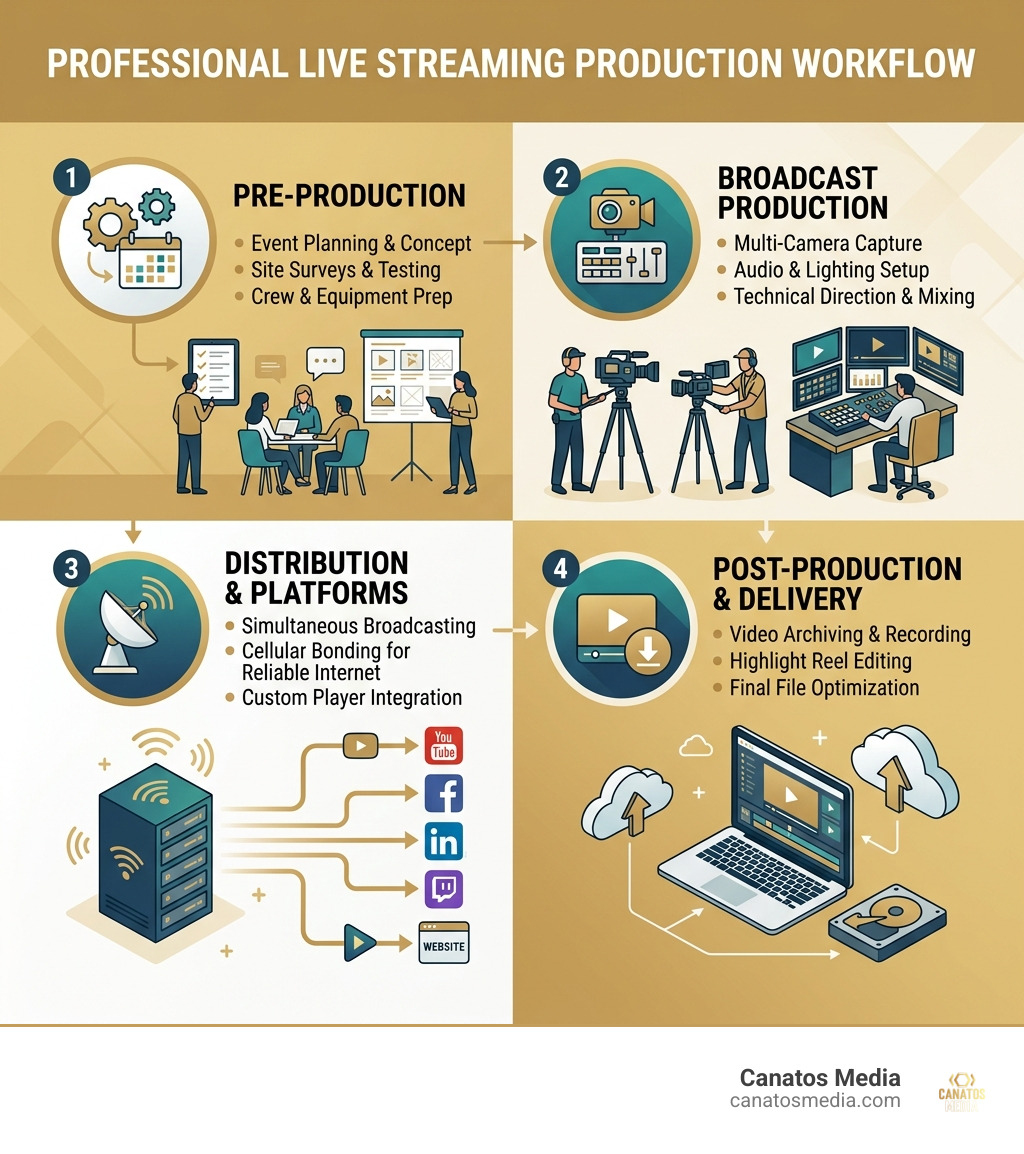
    Live streaming production workflow infographic showing pre-production, broadcast, platforms, and post-delivery - live

    What Does a Professional Live Streaming Production Company Do?

    When you hire a live streaming production company, you aren’t just paying for someone to hold a camera. You are hiring a full-service broadcast partner that bridges the gap between a physical room and a global digital audience. At Canatos Media, our Live Production team focuses on creating an immersive experience that rivals traditional television.

    Technical director at a multi-camera switching console managing a live broadcast - live streaming production company

    The core of the work involves multi-camera switching. This is where a technical director sits at a console and chooses the best angle in real-time. If a speaker is talking on stage, we might have one wide shot of the room, one tight shot on the presenter, and a third camera capturing audience reactions. We switch between these seamlessly, ensuring the viewer never gets bored.

    Beyond the cameras, these companies handle the “packaging” of your content. This includes:

    • Real-time graphics: Lower-thirds (names of speakers), logos, and full-screen data slides.
    • Interactive Q&A: Integrating tools like Slido or social media comments directly into the stream.
    • Global distribution: Ensuring your feed reaches viewers in the Tri-State area and across the world simultaneously.
    • Hybrid integration: Connecting remote speakers via Zoom or Teams into a high-end physical stage production.

    Whether it is a corporate town hall in a Manhattan skyscraper or a large-scale Commercial Production for a product launch, the production company acts as the “nervous system” of the event, coordinating every technical pulse.

    Why Your Business Needs a Live Streaming Production Company

    You might be tempted to just prop up an iPhone and hit “Go Live.” Please, for the sake of your brand authority, don’t do that. A professional team brings technical reliability. If your internet drops or a microphone dies during a DIY stream, the event is over. A professional crew has redundancies for everything.

    High-quality Services ensure that your audio is crisp and your lighting is cinematic. In live video, viewers will forgive a slightly fuzzy picture, but they will leave immediately if the audio is scratchy or echoing. We ensure broadcast-grade sound through digital mixers and professional-grade wireless mics, providing a seamless execution that reflects the quality of your brand.

    Platforms Supported by a Live Streaming Production Company

    A major advantage of working with pros is the ability to “simulcast.” This means we can send your video feed to multiple destinations at once. Common platforms include:

    • YouTube Live & Facebook Live: Great for public-facing community events and reach.
    • LinkedIn Live: The gold standard for B2B corporate events and thought leadership.
    • Twitch: Ideal for gaming, tech talks, or highly interactive sessions.
    • Custom OTT Platforms: For companies that want their own branded “Netflix-style” experience with pay-per-view or subscription options.
    • Vertical Streaming: Modern crews can now stream to Instagram or TikTok in a native vertical format while simultaneously broadcasting a horizontal 1080p feed to YouTube.

    Essential Technology and Equipment for High-Value Broadcasts

    To get “TV quality,” you need “TV gear.” A professional live streaming production company arrives with a van full of specialized equipment designed for the rigors of live broadcast.

    4K cinema cameras on a production floor prepared for a high-end live stream - live streaming production company

    We often utilize 4K cinema cameras because they offer a shallow depth of field, making your speakers pop off the screen. For more discreet setups, we use PTZ (Pan-Tilt-Zoom) units, which can be controlled remotely by a single operator, saving space in tight Tri-State venues. Check out our Case Studies to see how we’ve deployed these technologies in real-world scenarios.

    Other essential tech includes:

    • Dante Audio: A digital networking protocol that allows us to send high-quality audio over standard internet cables without interference.
    • Wireless Intercoms: So the director can talk to camera operators without the audience hearing a word.
    • Hardware Switchers: Dedicated machines (like Blackmagic ATEM or vMix systems) that handle the heavy lifting of video processing, ensuring the stream doesn’t crash.

    Standard Equipment Used by a Live Streaming Production Company

    Aside from the cameras, there is a “supporting cast” of gear:

    • Tripod systems: Fluid-head tripods for smooth pans and tilts.
    • Lighting kits: 3-point LED lighting to ensure presenters don’t look washed out or shadowed.
    • Jib arms: For those sweeping, cinematic overhead shots of a crowd.
    • Teleprompters: To help your executives stay on script while looking directly into the lens.
    • Professional monitoring stations: Multiple screens so the crew can see every angle and the “return feed” (what the viewers actually see).

    Solving Connectivity Issues with Cellular Bonding

    The biggest fear in live streaming is a “dead” internet connection. Many venues on Long Island or in NYC have notoriously spotty Wi-Fi. This is where cellular bonding saves the day.

    Using devices like LiveU units, we can “bond” together multiple cellular signals (4G and 5G) from different carriers (Verizon, AT&T, T-Mobile) into one super-stable internet pipe. If one carrier drops out, the others pick up the slack instantly. This provides a fail-safe internet protocol that allows us to stream from a parade float, a park, or a basement with zero downtime and stable bitrates.

    Understanding Pricing and Packages for Your Live Event

    Pricing for a live streaming production company is generally tiered based on the number of cameras and the size of the crew. While every project is unique, having a baseline helps with budgeting.
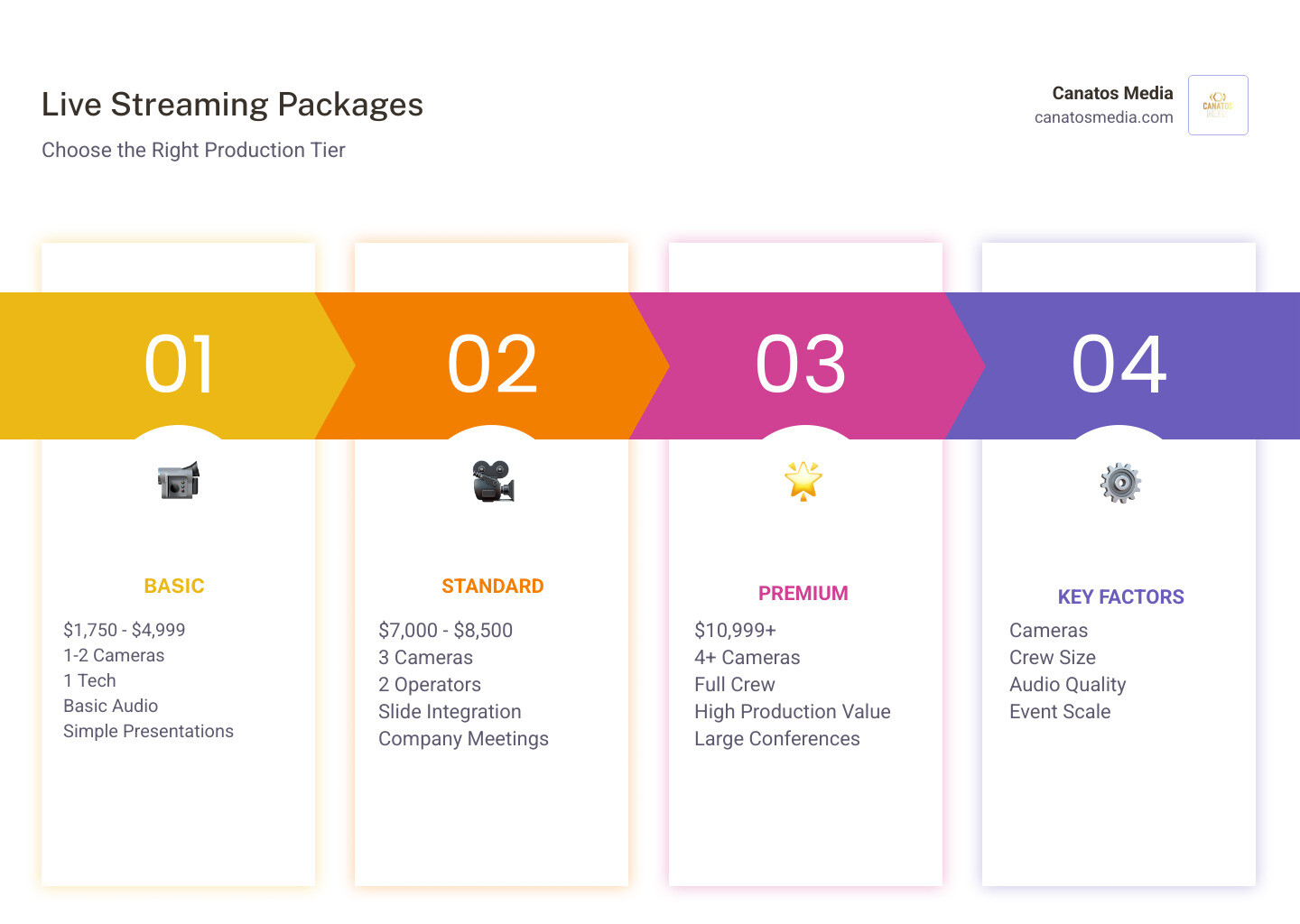
    Infographic comparing basic, standard, and premium live streaming packages - live streaming production company infographic

    Package Tier Typical Starting Price Best For Included
    Basic $1,750 – $4,999 Simple Presentations 1-2 Cameras, 1 Tech, Basic Audio
    Standard $7,000 – $8,500 Company Meetings 3 Cameras, 2 Operators, Slide Integration
    Premium $10,999+ Large Conferences 4+ Cameras, Full Crew, High Production Value

    You can view more detailed Pricing information on our site, but factors like travel within the Tri-State area or specialized equipment rentals (like Steadicams) can influence the final quote.

    Basic vs. Standard Production Tiers

    A Basic setup is usually a single-camera stream. This is perfect for a lone speaker at a podium. It is a “set it and forget it” style that captures the presentation and audio clearly but lacks dynamic movement.

    The Standard tier is the “sweet spot” for most corporate clients. It usually involves a 2 or 3-camera configuration. This allows for a “wide” shot of the stage and a “tight” shot of the speaker. It also includes professional slide integration, so the online audience sees the PowerPoint clearly on their screen rather than a blurry shot of a projector screen in the room.

    Premium and Elite Production Packages

    When you move into Premium territory, you are hiring a small army of specialists. This includes:

    • Technical Directors: The “conductor” of the broadcast.
    • Video Engineers: Who ensure the colors match across all cameras (shading).
    • Audio Engineers: Dedicated to managing complex soundscapes, like panels with 8+ microphones.
    • Elite Add-ons: This might include 4K streaming, custom-built landing pages with paywalls, or even augmented reality (AR) elements integrated into the video.

    How a Live Streaming Production Company Ensures Reliability

    Reliability is the product we are actually selling. Anyone can buy a camera; not everyone can ensure a 3-hour broadcast goes off without a single glitch.

    We achieve this through signal redundancy. We often record the “clean” feed of every camera locally to hard drives while simultaneously streaming. If the internet fails globally, we still have a high-definition recording ready for immediate upload. We also use backup power systems (UPS) to ensure that a tripped circuit breaker at the venue doesn’t take the whole show offline.

    Before any event, we perform rigorous network testing. We don’t just check the speed; we check for “jitter” and “packet loss,” which are the real killers of video quality. If you’re planning an event, we recommend a Consultation Booking early in the process so we can scout your venue and test the infrastructure.

    Key Considerations When Selecting a Live Streaming Production Partner

    Choosing the right partner is about more than just the gear. You need a team that understands your specific geography and needs. If you are in the Tri-State area or Long Island, you want a crew that knows the local venues and the logistical hurdles of NYC production.

    Consider these factors:

    1. Crew Staffing: Does the company have their own regular crew, or do they hire random freelancers? Consistency matters.
    2. Scalability: Can they handle a small 10-person meeting and a 1,000-person hybrid conference?
    3. Client Portfolio: Look for a variety of work—from corporate keynotes to entertainment events.
    4. Technical Support: Do they offer pre-production planning and “speaker coaching” to ensure your presenters look and sound their best?

    If you’re ready to start the conversation, you can Contact Us to discuss your vision.

    Frequently Asked Questions about Live Streaming Production

    What is the difference between a webinar and a professional live stream?

    A webinar (like a standard Zoom call) is designed for two-way communication and is usually low-resolution. A professional live stream is a “one-to-many” broadcast. It uses high-end cameras, professional lighting, and cinematic switching to create a polished, “TV-like” experience for the viewer.

    How many crew members are needed for a standard corporate live stream?

    For a standard 3-camera setup, you typically need at least two or three people: a Technical Director (to switch the show) and one or two Camera Operators. Larger shows may add a dedicated Audio Engineer and a Graphics Operator.

    Can you live stream from a location with no hardwired internet?

    Yes! Thanks to cellular bonding technology (like LiveU or Teradek systems), we can combine multiple 5G signals to create a high-speed connection almost anywhere in the Tri-State area, even in parks or outdoor venues.

    Conclusion

    Hiring a live streaming production company is an investment in your brand’s digital presence. In an era where “hybrid” is the new standard, your online audience deserves the same high-quality experience as the people sitting in the front row.

    At Canatos Media, we don’t just provide cameras; we provide an integrated digital strategy. We combine cinematic content with expert targeting to ensure your live event reaches the right people and drives measurable growth. Whether you need a simple webcast or a complex multi-city hybrid production, we have the experience to make it happen.

    Ready to take your next event live? Visit our Home page or jump straight to our Live Production Services to learn more.
  • Stop Playing Webmaster and Start Running Your Business

    Stop Playing Webmaster and Start Running Your Business

    Why Small Business Owners Are Burned Out by Their Own Websites

    Web management services for small businesses are professional solutions that handle the technical upkeep, security, performance, and content updates of your website — so you can focus on running your business instead.

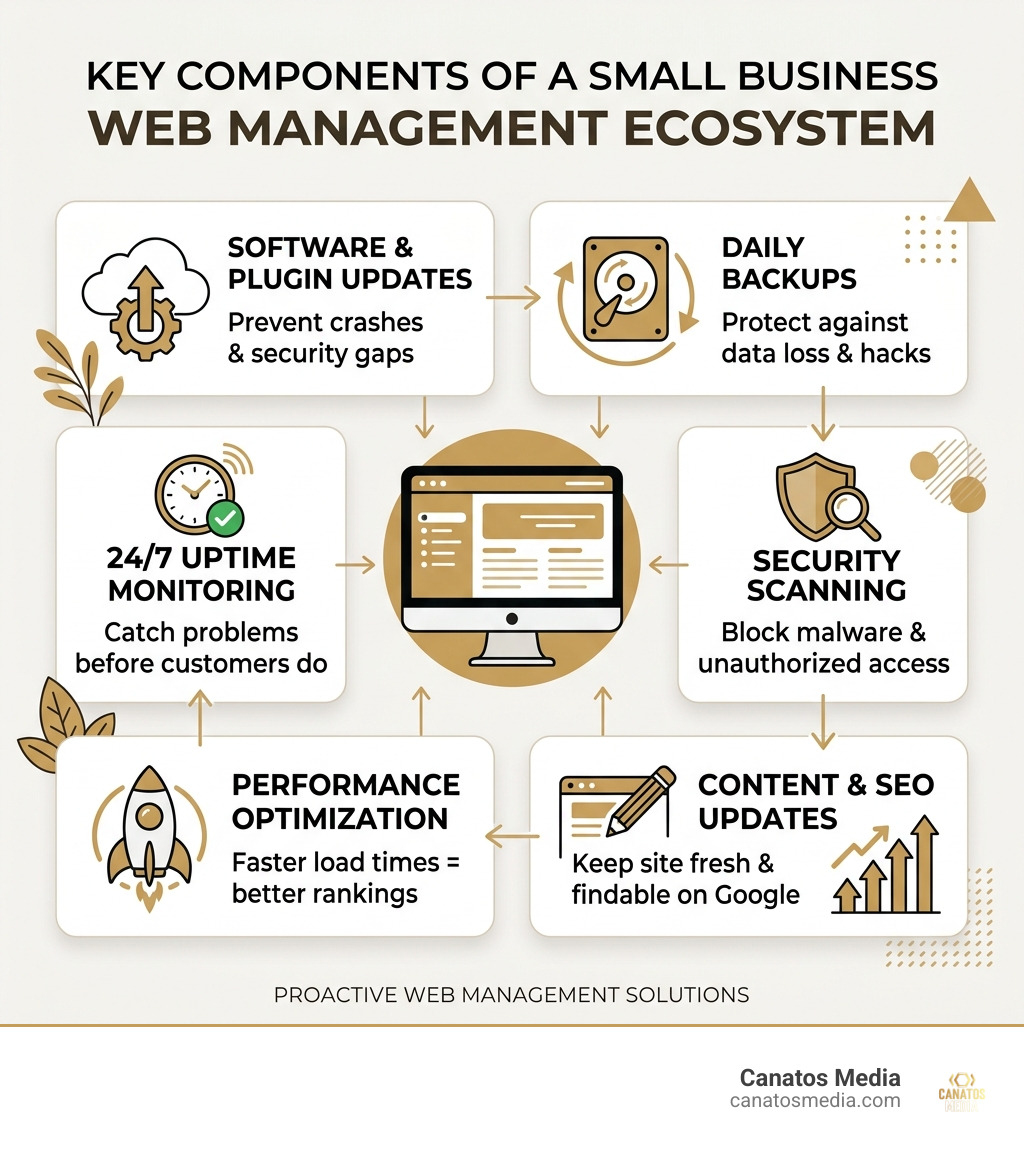
    Here’s a quick look at what these services typically cover:

    What’s Included Why It Matters
    Software & plugin updates Prevents crashes and security gaps
    Daily backups Protects against data loss and hacks
    24/7 uptime monitoring Catches problems before customers do
    Security scanning Blocks malware and unauthorized access
    Performance optimization Faster load times = better rankings
    Content updates Keeps your site accurate and fresh
    SEO hygiene Helps you get found on Google

    Think about this: the average small business owner spends 17 hours every month just maintaining their website. That’s more than two full workdays — spent on plugin conflicts, security patches, and broken forms instead of serving customers.

    And the stakes are high. Website downtime alone costs businesses an average of $300,000 per hour. Yet most small business owners are either ignoring their site, fumbling through fixes themselves, or waiting days for a freelancer to respond.

    Meanwhile, 88% of buyers research a company online before they ever pick up the phone.

    Your website isn’t a brochure. It’s your hardest-working salesperson — and right now, it might be calling in sick.

    I’m Nic Canobbio, founder of Canatos Media, with over two decades of experience in media production, business strategy, and building content systems that drive measurable results — including social content that has reached over 60 million views. My work across media and business development gives me a front-row seat to how web management services for small businesses can either unlock growth or become an invisible bottleneck holding you back. Let’s break down exactly how to fix that.

    infographic showing components of a web management ecosystem for small businesses - web management services for small

    What Are Web Management Services for Small Businesses?

    In the digital landscape of May 2026, a website is no longer a “set it and forget it” asset. It is a complex ecosystem of software, databases, and third-party integrations. Web management services for small businesses act as your outsourced technical department. Instead of you logging into a dashboard and wondering why a plugin update just turned your homepage into a wall of white text, a professional team handles the heavy lifting behind the scenes.

    Professional web management encompasses several critical layers:

    1. Hosting Management: We ensure your site lives on a fast, reliable server optimized for your specific traffic needs.
    2. Security Protocols: This involves more than just an SSL certificate. It includes real-time malware scanning, firewall management, and immediate vulnerability patching.
    3. Performance Optimization: We monitor Core Web Vitals—the metrics Google uses to judge how fast and stable your site is.
    4. Content Updates: Whether it’s changing a price, adding a new team member, or posting a blog, management services handle these edits so your site never looks “stale.”
    5. Technical Support: When something breaks (and in code, something eventually does), you have a direct line to experts who fix it in minutes, not days.

    At Canatos Media, we view this as part of a larger Web Management Approach where your website serves as the foundation for your entire digital presence. You can explore our full range of digital services to see how technical support integrates with creative growth.

    professional web development team monitoring site health and security - web management services for small businesses

    5 Key Benefits of Professional Website Oversight

    Why should a local business in Long Island or the tri-state area invest in professional oversight? It comes down to the difference between a website that simply exists and one that actually performs.

    • 24/7 Monitoring and Uptime: Most owners only realize their site is down when a frustrated customer calls. Professional services use automated tools to ping your site every minute. If it goes down, we’re already fixing it before you even finish your morning coffee.
    • Malware Prevention and Security: Skipping a single WordPress update is like leaving your front door wide open while posting your vacation plans on social media. We apply security patches the moment they are released.
    • Improved Search Rankings: Google favors sites that are fast, mobile-responsive, and error-free. By maintaining high “SEO hygiene,” we ensure your business remains visible to the 88% of buyers researching online.
    • Customer Trust: A broken link or a “Not Secure” warning in the browser bar is the fastest way to lose a lead. Professional management keeps your digital storefront looking polished and trustworthy.
    • Time Freedom: Reclaiming those 17 hours a month allows you to focus on high-level strategy rather than technical troubleshooting.

    By offloading these tasks, you can focus on building an All In One Marketing Funnel that actually converts those visitors into long-term clients.

    Strategic Growth and Scalability

    As your business expands, your website must grow with it. Maybe you’re moving from a simple service site to an eCommerce platform, or perhaps you’re launching a membership area. Web management services for small businesses provide the technical infrastructure to scale without the growing pains. We handle the lead generation architecture and conversion rate optimization (CRO) so your site doesn’t just look pretty—it makes money.

    Cost-Efficiency vs. In-House Hiring

    Hiring a qualified web professional in-house is a massive financial commitment. In 2026, a mid-level web manager commands a salary of $30,000 to $40,000 annually before benefits, taxes, and office overhead. For most small businesses, that’s simply not feasible. Outsourcing to an agency gives you access to a whole team of specialists—designers, developers, and SEO experts—for a fraction of the cost of one full-time employee. You get agency-grade tools and expertise without the enterprise-level price tag.

    Comparing DIY, Freelancers, and Managed Agencies

    Many business owners start with a DIY approach or hire a cheap freelancer. While these might seem like budget-friendly options initially, they often lead to “technical debt”—issues that pile up and cost more to fix later.

    Feature DIY Builders (Wix/Squarespace) Freelancers Managed Agencies
    Initial Cost Low Moderate Moderate/Monthly
    Reliability High (Platform-dependent) Variable (The “Ghosting” Risk) High (SLA Guaranteed)
    Customization Limited/Templates High High & Strategic
    Security Basic Manual/Inconsistent Proactive/24/7
    SEO Depth Surface Level Technical Only Integrated Strategy
    Support Chatbots/Wait Times Whenever they’re awake Dedicated/Fast Response

    DIY platforms are great for hobbies, but they can become a “straightjacket” when you need custom functionality. Freelancers can be talented, but if they get sick or take a vacation, your site is left vulnerable. Managed services win because they offer Service Level Agreements (SLAs). This means you have a contractually guaranteed response time and a team that never “disappears.”

    How Web Management Services for Small Businesses Drive ROI

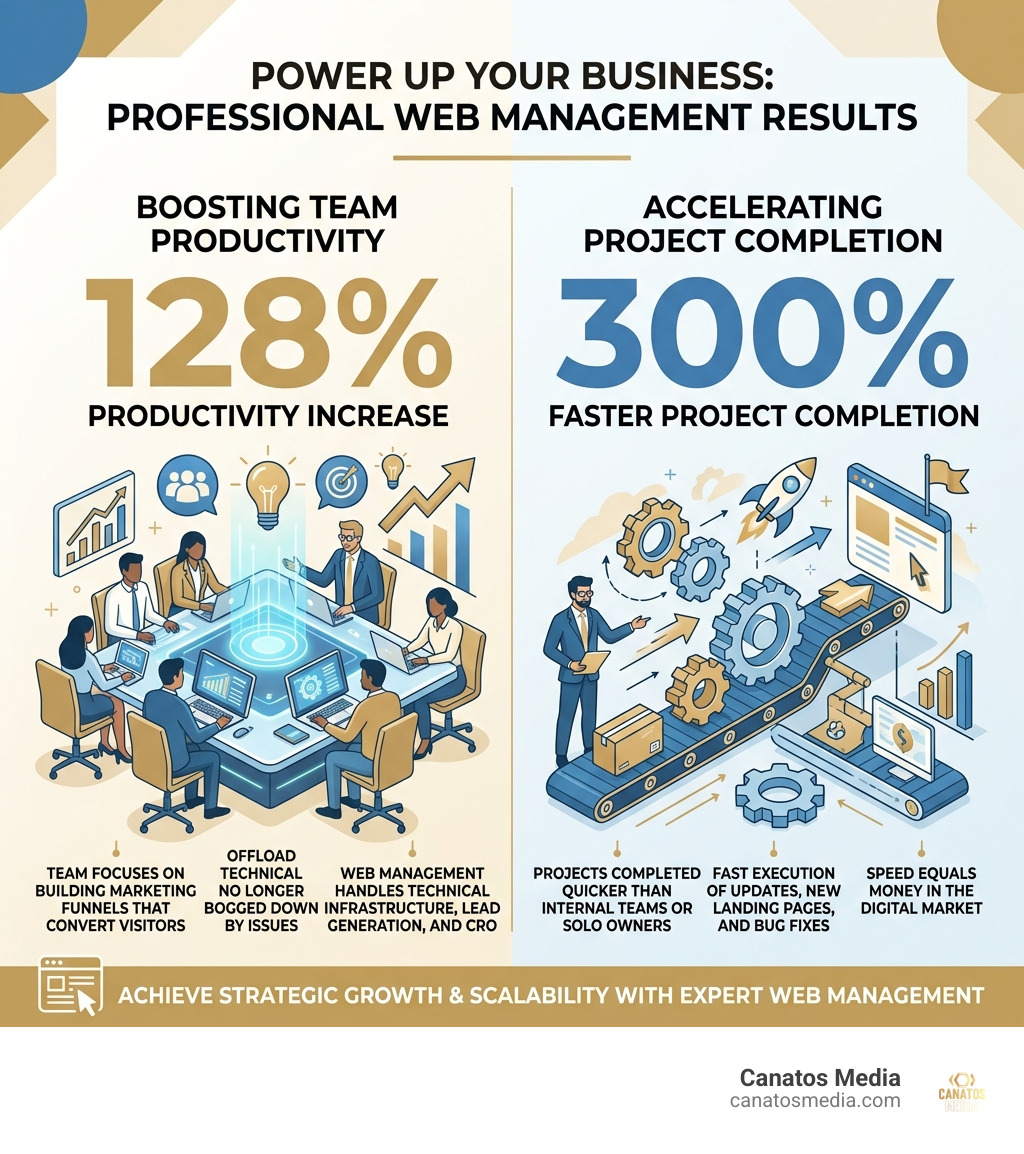
    Investing in your website isn’t an expense; it’s a revenue driver. Statistics show that businesses using professional website management achieve up to a 128% increase in productivity. Why? Because the team isn’t bogged down by tech issues, and the website is actually doing its job of capturing leads.

    Furthermore, professional teams complete projects 300% faster than internal teams or solo owners. Whether it’s launching a new landing page or fixing a checkout bug, speed equals money.

    infographic showing 128 percent productivity increase and 300 percent faster project completion with professional web

    Maximizing Performance with Web Management Services for Small Businesses

    Page speed is a major ranking factor in 2026. A one-second delay in load time can significantly lower your ad ROI and search engine position. We utilize advanced techniques like:

    • Image Compression: Making sure your high-res photos don’t bog down the site.
    • Browser Caching: Storing parts of your site on the visitor’s computer so it loads instantly on their next visit.
    • Mobile Responsiveness: Ensuring the experience is flawless on smartphones, where the majority of browsing now happens.

    You can view our transparent Pricing to see how these performance tiers fit your budget.

    Enhancing Security with Web Management Services for Small Businesses

    Cybersecurity is no longer optional. With WordPress powering 40% to 60% of all websites, it is a constant target for hackers. Our management services include:

    • Daily Off-site Backups: If the worst happens, we can restore your site to a clean version in minutes.
    • Ransomware Protection: Keeping your data—and your customers’ data—safe from encryption attacks.
    • Vulnerability Patching: We don’t wait for “Update Tuesday.” We patch high-risk bugs the moment they are discovered.

    If you’re concerned about your current site’s security, don’t hesitate to Contact Us for an audit. You can also check out our Case Studies to see how we’ve secured and grown other local businesses.

    Frequently Asked Questions about Website Management

    What do professional web management services typically cost?

    Pricing for web management services for small businesses typically follows a subscription or retainer model. This provides predictability for your budget. Most small business plans range from $50 to $800 per month, depending on the complexity of the site. A basic blog or “brochure” site might be on the lower end, while a high-traffic eCommerce store or a site with a membership area requires more “hands-on” hours and advanced security.

    How do these services handle security and backups?

    We believe in the “Belt and Suspenders” approach. We perform daily backups that are stored in encrypted, off-site locations. This ensures that even if a data center is hit by a literal meteor, your business data is safe. We also implement real-time scanning to catch malware before it can take root, and we provide disaster recovery services as part of our core plans.

    Can I still make my own content updates?

    Absolutely! We don’t hold your website “hostage.” You will always have full CMS access. Most of our clients prefer to send us a quick message to handle updates, but we also provide training if you or your staff want to handle day-to-day blogging or minor text changes. Think of us as your “web department on call”—we’re here to do as much or as little as you need.

    Conclusion

    The days of being your own IT person are over. To compete in the tri-state area and Long Island markets, your business needs a digital presence that is fast, secure, and strategically aligned with your goals.

    At Canatos Media, we offer more than just technical support. We provide an integrated strategy that connects cinematic short-form video, expert social media management, and precision-targeted paid advertising (Meta and Google) with a rock-solid website foundation. Our goal isn’t just to keep your site “online”—it’s to drive measurable growth.

    Stop losing hours to plugin updates and start spending them on your customers. Ready to level up? Book a Consultation today and let’s turn your website back into your most valuable asset.

  • Step-by-Step Guide to Paid Ads

    Step-by-Step Guide to Paid Ads

    What Are Paid Ads (and Why They Matter for Your Business in 2026)

    Paid ads are a form of digital marketing where you pay a platform — like Google, Meta, or YouTube — to show your message to a specific audience. Unlike organic content, paid ads deliver immediate visibility the moment your campaign goes live.

    Here’s a quick breakdown:

    • What they are: Ads you pay to place in front of targeted users on search engines, social platforms, and websites
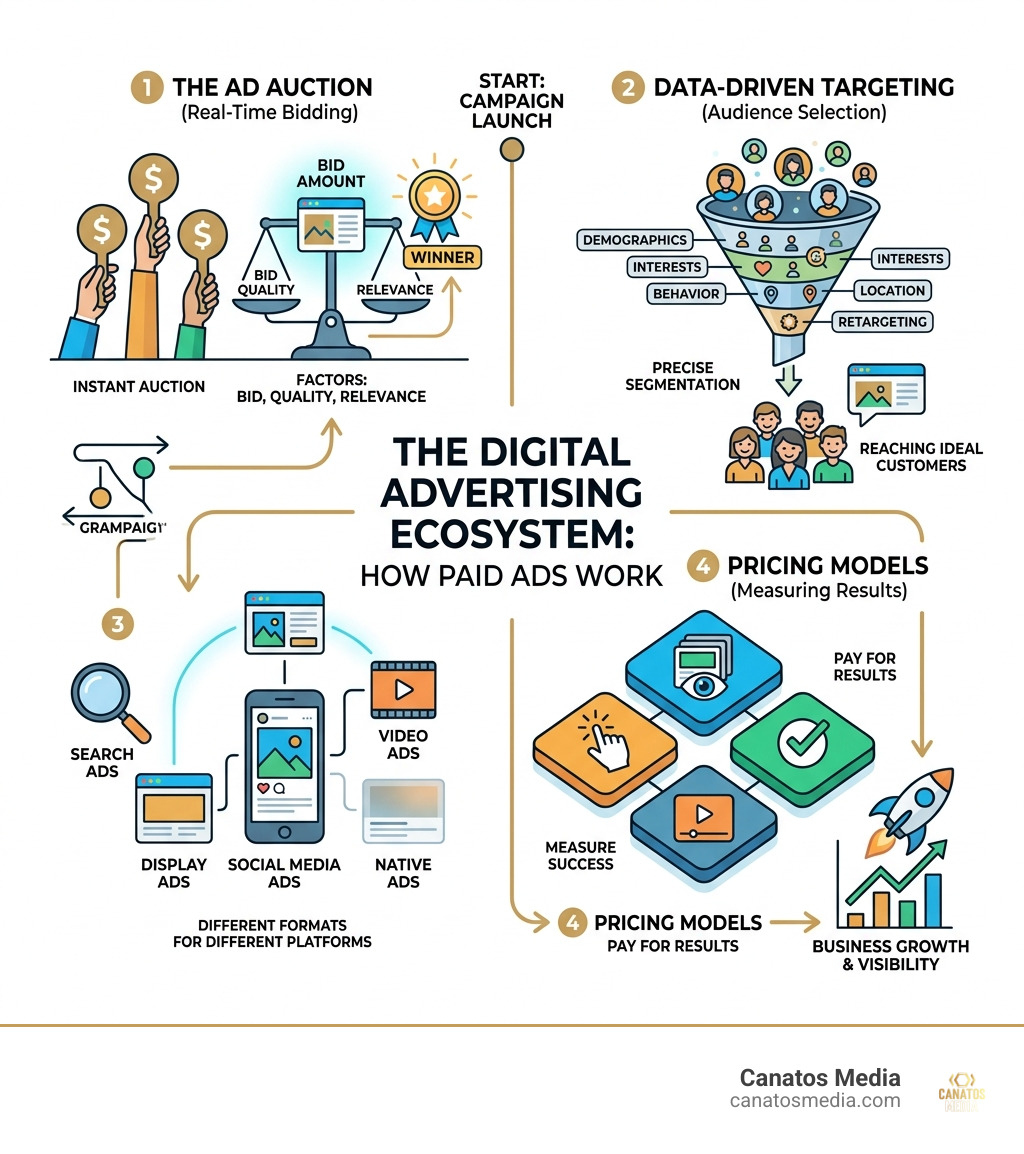
    • How they work: You bid in a real-time auction; the platform shows your ad based on your bid, ad quality, and relevance
    • Common formats: Search ads, display ads, social media ads, video ads, and native ads
    • Pricing models: Pay-per-click (PPC), cost-per-thousand impressions (CPM), cost-per-action (CPA), cost-per-view (CPV)
    • Who uses them: Businesses of any size looking to drive traffic, generate leads, or boost sales — fast

    Organic marketing like SEO takes months to gain traction. Paid ads can put your business in front of ready-to-buy customers today.

    For local businesses especially, that speed matters. Every day without visibility is a day a competitor is capturing your potential customers.

    I’m Nic Canobbio, founder of Canatos Media, and with over two decades in media production and business strategy, I’ve helped brands scale through smart paid ads that combine data-driven targeting with compelling creative. This guide walks you through everything I’ve learned — step by step.

    How paid ads fit into the digital advertising ecosystem: auction, targeting, formats, and pricing models - paid ads

    Understanding the Mechanics of Paid Advertising

    To master paid ads, you first need to understand the “engine” under the hood. It isn’t just about throwing money at a screen; it’s a sophisticated, automated marketplace that operates in milliseconds.

    A digital marketing dashboard showing a real-time auction process and ad performance metrics - paid ads

    At its core, most modern advertising platforms use an auction system. Every time a user opens a webpage or performs a search, an auction happens behind the scenes. Algorithms determine which ads appear based on several factors: your bid amount, the quality of your ad, and how relevant that ad is to the user’s current intent.

    For businesses in the tri-state area and Long Island, this means you aren’t just competing on price. You are competing on how well you understand your local customer. If your ad is highly relevant and provides a great landing page experience, you can often “win” the auction even if a competitor bids more than you.

    If you are ready to stop guessing and start growing, you can Start your growth journey with our professional services.

    Feature Paid Media Organic Media Earned Media
    Speed Immediate Slow/Long-term Variable
    Control High (Budget/Targeting) Medium (Content) Low (Third-party)
    Cost Direct payment per result Time and resource heavy Indirect (PR/Relations)
    Longevity Stops when budget ends Lasts indefinitely Lasts as long as the buzz

    We often get asked: “If I’m doing SEO, do I really need paid ads?” The answer is almost always yes. Organic media (SEO and organic social) is your long-term foundation. It builds trust and authority. However, search engine results pages (SERPs) are increasingly crowded with sponsored content.

    Even if you rank #1 organically for “custom suits in Long Island,” there might be three or four ads appearing above you. Paid ads allow you to “jump the line” and gain immediate reach. By combining the two, you create a All-in-One Marketing Funnel where paid traffic fuels immediate sales while organic traffic lowers your average customer acquisition cost over time.

    How the Ad Auction Works

    When you set up a campaign, you don’t just “buy” a spot like a traditional billboard. You participate in real-time bidding. The platform’s algorithm looks at your:

    1. Bid: The maximum you’re willing to pay for a click or impression.
    2. Ad Quality: How engaging your ad is (measured by click-through rate).
    3. Relevance: How well your ad matches what the user is looking for.
    4. Landing Page Experience: Does the link lead to a helpful, fast-loading site?

    This system ensures that users see ads they actually care about, which keeps them using the platform. To learn how to navigate these settings for social platforms, check out our guide on Paid Social Media Advertising From Zero to Hero in One Hour.

    Major Platforms and Types of Paid Ads

    Choosing where to run your paid ads depends entirely on where your customers hang out. In May 2026, the digital landscape is more fragmented than ever, but several giants still dominate the reach.

    Various ad formats displayed across mobile devices and desktop screens, showing search and social placements - paid ads

    Search and Display Advertising

    Google Ads remains the heavyweight champion of “intent-based” marketing. When someone searches for a service, they are actively looking for a solution. The Google Display Network is equally massive, covering over 2 million sites and reaching over 90% of people on the internet. In fact, it includes over 35 million websites and apps where your visual ads can appear.

    Microsoft Advertising (formerly Bing) is also a significant player, often offering a lower cost-per-click for B2B industries. Whether you want to Drive sales, Stand out, Be found, Show up, with Google Ads, the goal is to be there the moment the customer needs you.

    Social Media and Video Placements

    Social media ads allow for incredible “persona-based” targeting. You can target people based on their interests, job titles, or even life events.

    • X (formerly Twitter): With 535 million global monetizable monthly active users (mMAU), X has become a primary platform for discovery. Users spend an average of 30.9 minutes daily on the platform, and it ranks as the #1 platform for discovery compared to competitors.
    • YouTube: Reaching over 2.7 billion monthly active users, YouTube is the king of video ads. It’s perfect for the cinematic storytelling we specialize in at Canatos Media.
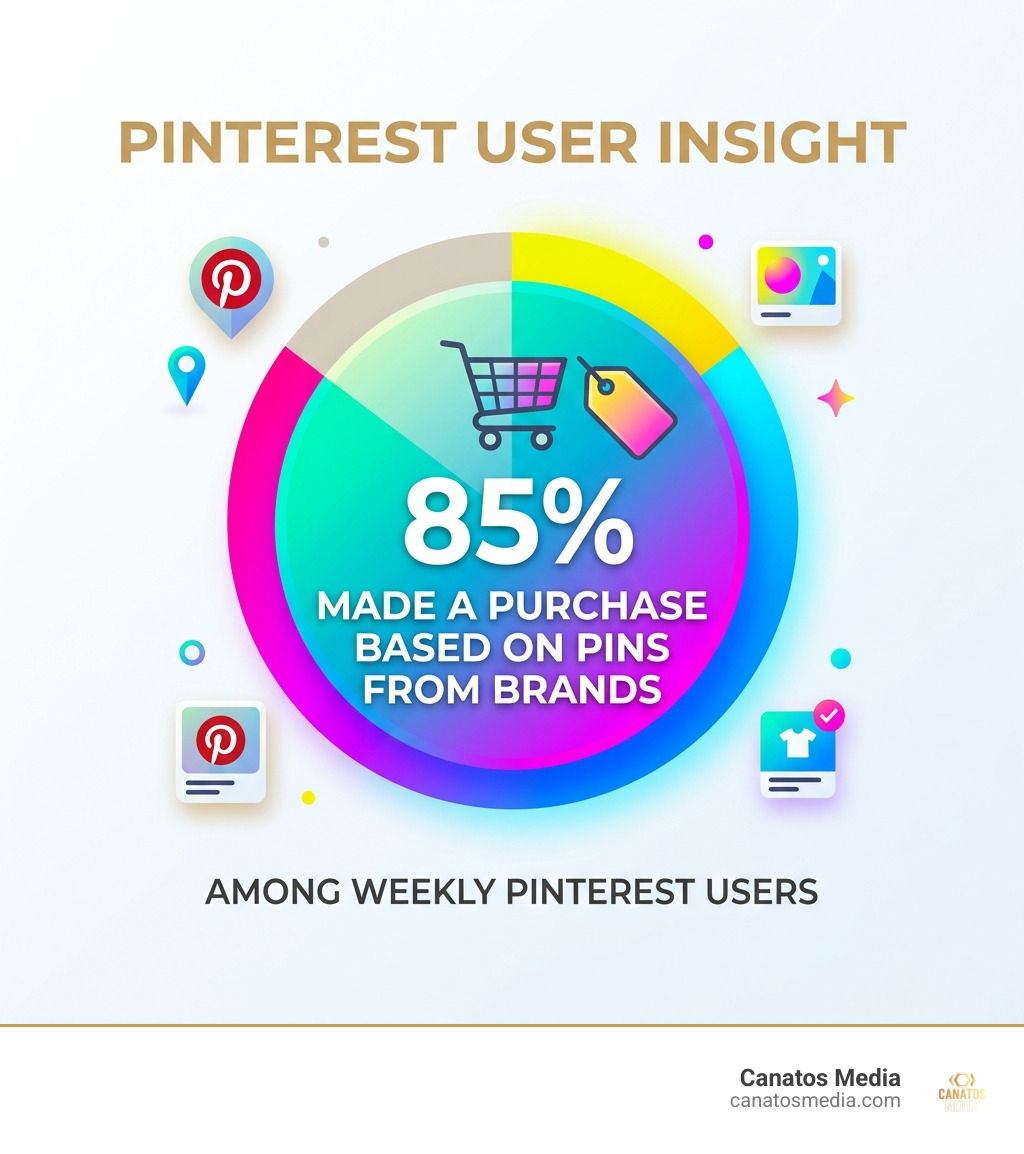
    • Pinterest: This is a sleeper hit for e-commerce. 85% of weekly Pinterest users have made a purchase based on Pins they saw from brands.
    • Meta (Facebook/Instagram): Despite being the “older” platforms, they remain essential for reach. The average Facebook CPM (cost per 1,000 impressions) in late 2024 was around $13.75, making it a cost-effective way to build awareness.

    To see how we’ve applied these platforms for local success, take a look at our Karako Suits Campaign case study. Our Services are designed to help you navigate these choices effortlessly.

    Building a High-ROI Advertising Strategy

    A successful paid ads strategy isn’t built on a whim; it’s built on data and clear objectives. We always recommend starting with the SMART framework: Specific, Measurable, Actionable, Relevant, and Time-bound goals.

    Selecting Pricing Models

    Understanding how you are charged is vital for budget management. The most common models include:

    • PPC (Pay-Per-Click): You only pay when someone actually clicks your ad. This is the gold standard for search advertising.
    • CPM (Cost-Per-Mille): You pay for every 1,000 times your ad is shown. This is best for brand awareness and “top of funnel” visibility.
    • CPA (Cost-Per-Action): You pay only when a specific action is completed, such as a sale or a sign-up.
    • CPV (Cost-Per-View): Common for video platforms like YouTube, where you pay when someone watches a certain amount of your video.

    Leveraging AI and Automation

    By May 2026, AI has completely transformed how we run paid ads. Tools like Google’s Performance Max and Meta’s Advantage+ use machine learning to automatically find the best-performing ad formats and audiences for your goals.

    AI can help with:

    • Smart Bidding: Adjusting your bids in real-time to maximize conversions.
    • Automated Creative: Testing different combinations of headlines and images to see what resonates.
    • Audience Expansion: Finding “lookalike” audiences who behave just like your best customers.

    We integrate these advanced tools into our All-in-One Marketing Funnel to ensure your budget is never wasted on low-performing segments. For a deeper dive into these tactics, check out Paid Social Media Advertising From Zero to Hero in One Hour.

    Optimization and Performance Measurement

    The “set it and forget it” approach is the fastest way to lose money in advertising. Continuous optimization is the secret to high Return on Ad Spend (ROAS).

    Key Metrics to Track

    To know if your paid ads are working, you must look beyond “vanity metrics” like likes or impressions. Focus on:

    • ROAS (Return on Ad Spend): If you spend $1 and make $5, your ROAS is 5:1. For example, some brands using Shopify Audiences have reported a ROAS as high as 3x using targeted lists.
    • CTR (Click-Through Rate): The percentage of people who saw your ad and clicked it. A low CTR usually means your creative or targeting is off.
    • CPA (Cost Per Acquisition): How much it costs you to get one new customer.
    • Conversion Rate: The percentage of visitors who complete the desired action on your landing page.

    We track these metrics religiously for our clients, as seen in the Karako Suits Campaign.

    Common Mistakes to Avoid

    In our experience working across the tri-state area, we see the same mistakes repeated:

    1. Broad Targeting: Trying to reach “everyone” usually means reaching no one. Be specific.
    2. Poor Landing Pages: If your ad is great but your website is slow or confusing, people will leave immediately.
    3. Ignoring Negative Keywords: In search ads, you should tell the platform what you don’t want to show up for (e.g., if you sell luxury cars, you might add “used” or “cheap” as negative keywords).
    4. Ad Fatigue: Showing the same image to the same audience for too long leads to them tuning it out.

    Avoid these pitfalls and Start your growth journey with our professional services.

    Conclusion and Frequently Asked Questions

    Paid ads are the most powerful tool in your marketing arsenal for generating immediate results. However, they work best when integrated into a larger strategy. At Canatos Media, we don’t just “run ads.” We create the cinematic video content that stops the scroll, manage the social presence that builds trust, and use data-driven targeting to ensure your message hits the right eyes in Long Island and the tri-state area.

    Stat showing that 85% of weekly Pinterest users have made a purchase based on Pins from brands - paid ads infographic

    If you’re ready to see measurable growth, let’s talk about how we can build your All-in-One Marketing Funnel.

    How much do paid ads typically cost?

    The beauty of paid ads is that you are in total control. You can start with as little as $5 or $10 a day. However, costs vary by industry and competition. For instance, the average Facebook CPM is roughly $13.75, but a highly competitive keyword in Google Ads (like “lawyer” or “insurance”) can cost much more per click. We help you set a budget that aligns with your profit margins so your advertising remains a profitable investment, not an expense.

    What are the key benefits of paid ads for businesses?

    The primary benefits are speed and precision. You get instant traffic the moment you launch. You can target users with surgical precision based on their location, interests, search history, and even the device they are using. Most importantly, everything is measurable. You know exactly which dollar produced which lead, allowing you to scale what works and cut what doesn’t.

    How can AI improve my advertising performance?

    AI acts as a 24/7 data analyst for your campaigns. It uses predictive analytics to determine which users are most likely to convert and adjusts your bids accordingly. It can also help with creative optimization by automatically serving the best combination of images and text to each individual user. By using AI-powered tools like Performance Max, businesses can reach customers across Search, YouTube, and Display from a single campaign, ensuring no opportunity is missed.

    Ready to take the next step? Start your growth journey with our professional services today.

  • Battle of the Bites: Most Popular Short-Form Content Platforms

    Battle of the Bites: Most Popular Short-Form Content Platforms

    The Short-Form Video Race: Which Platforms Win in 2026?

    The most popular short-form content platforms right now are:

    Rank Platform Monthly Active Users Best For
    1 TikTok ~2 billion Discovery, Gen Z, shopping
    2 YouTube Shorts 2+ billion SEO, long-form funneling
    3 Instagram Reels ~1.8 billion Brands, Millennials, aesthetics
    4 Snapchat Spotlight Teen audiences, AR
    5 LinkedIn Video B2B, professional content

    Scroll is the new prime time. In 2026, short-form video is where attention lives — and where buying decisions get made fast.

    Think about this: nearly 1 in 4 people have made a purchase within three minutes of watching a short video. That’s not browsing. That’s impulse buying at digital speed.

    For local businesses trying to grow online, this shift is both an opportunity and a challenge. There are more platforms than ever. Each one has a different audience, a different algorithm, and a different set of rules.

    The question isn’t just “should I be on short-form video?” — it’s “which platform is actually worth your time and budget?”

    This guide breaks it all down.

    I’m Nic Canobbio, founder of Canatos Media, and with over two decades in media production and content strategy — including social content that has surpassed 60 million views — I’ve spent years studying what works across the most popular short-form content platforms. Let’s get into it.

    Infographic showing evolution of video length from Vine's 6 seconds in 2013 to TikTok's 10 minutes in 2026 - most popular

    Defining the Short-Form Video Revolution

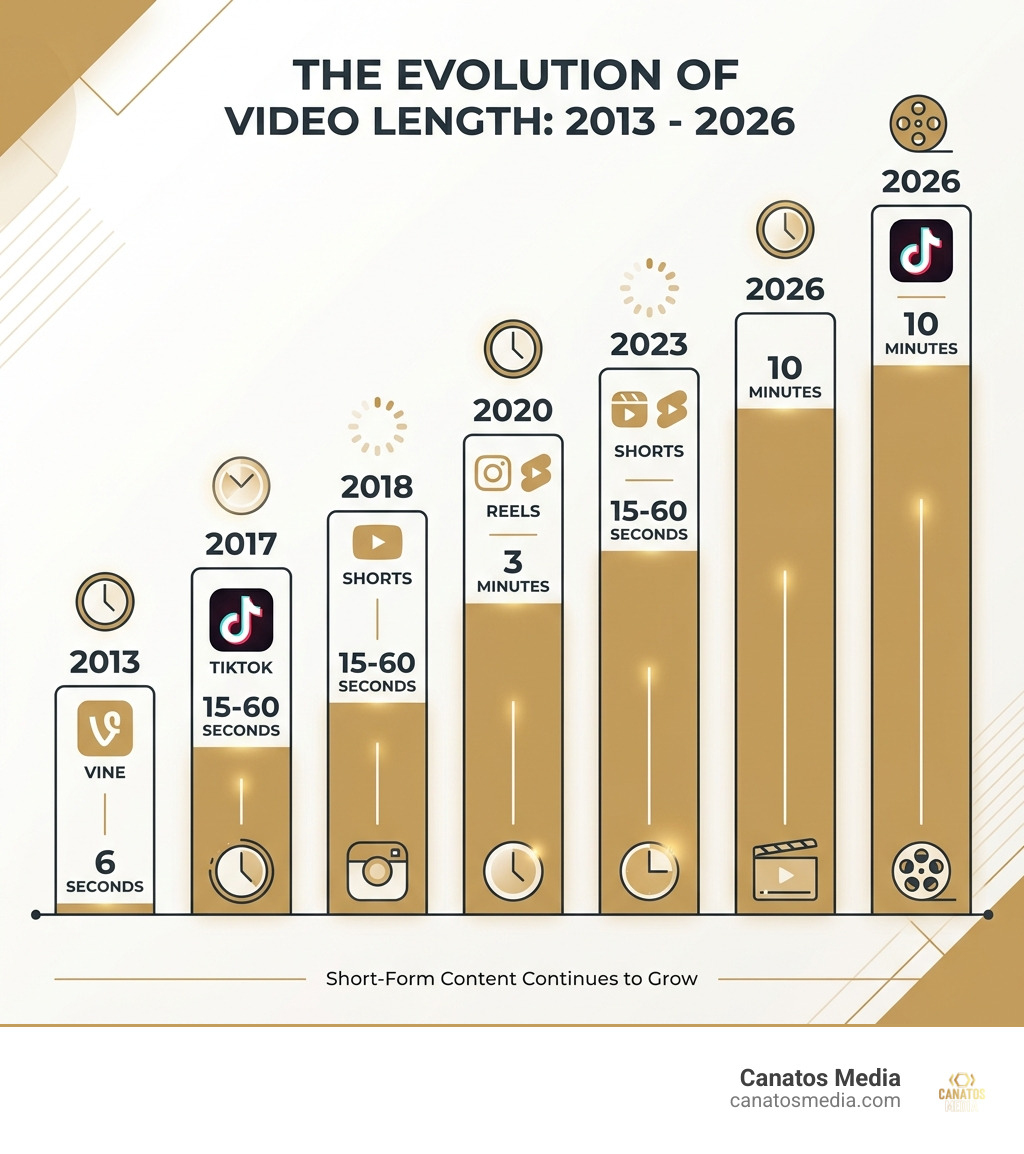
    What exactly makes a video “short-form” in May 2026? While the definitions have stretched over the years, the core remains the same: it is vertical content (9:16 aspect ratio) designed for mobile-first consumption. These videos are typically under 60 seconds, though platforms now allow for longer durations to accommodate deeper storytelling.

    The appeal lies in “micro-moments.” We are living in a culture of instant gratification. Whether someone is waiting for a train in Manhattan or grabbing a coffee on Long Island, they are likely scrolling. This behavior has led to staggering engagement stats. For instance, Gen Z users now spend an average of 528 hours annually on TikTok—that is nearly 22 full days of their year spent inside a single app.

    This revolution has fundamentally changed how we shop. Short-form video is the king of impulse purchasing. Research shows that 51% of people cite TikTok’s content as their top influencer for unplanned buys. This is driven by User-Generated Content (UGC) and “sludge content”—multi-pane videos that keep the brain stimulated—alongside micro-storytelling that hooks the viewer within the first three seconds.

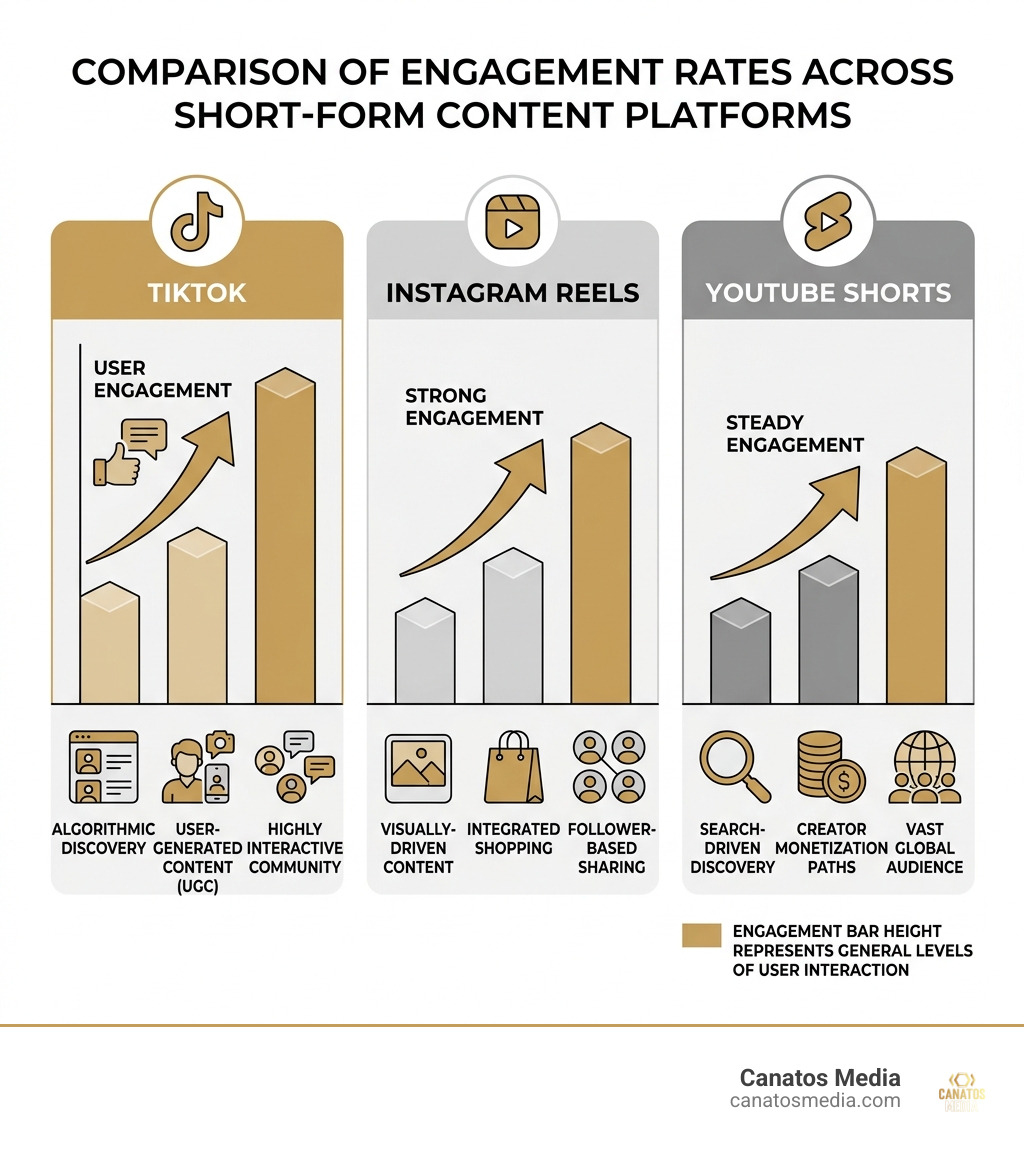
    When we look at the most popular short-form content platforms globally, three giants dominate the conversation. While they share the vertical format, their algorithms and monetization paths differ significantly.

    Comparison of engagement rates across TikTok, Reels, and YouTube Shorts - most popular short-form content platforms

    Successfully navigating these requires more than just posting; it requires All-in-One Social Content and Management to ensure your brand voice stays consistent while the algorithms do the heavy lifting.

    TikTok remains the heavyweight champion of discovery. With roughly 2 billion monthly active users, its “For You Page” (FYP) is the gold standard for algorithmic personalization. Unlike older social media that relied on who you followed, TikTok shows you what you actually like.

    For businesses, the TikTok Global Community offers a massive marketplace. In the US and Indonesia (the platform’s two largest markets), TikTok Shop has turned the app into a full-scale e-commerce engine. The demographics are slightly female-skewed (53%), with a massive 38.5% of the user base falling in the 18-24 age bracket. If you want to go viral through music remixing and fast-moving trend cycles, this is the place to be. You can find the app on the App Store or Google Play to see the latest trends in action.

    YouTube Shorts has exploded, reaching over 200 billion daily views. Its secret weapon? It is owned by the world’s second-largest search engine. This gives Shorts an SEO advantage that TikTok and Reels can’t match.

    YouTube Shorts are now allowed to be up to three minutes long, providing more room for “how-to” content and product demos. The audience here leans male (56%) and is particularly strong in India and the US. For brands, Shorts act as a “top-of-funnel” tool, driving viewers toward longer, high-conversion videos or Paid Social Media Advertising from Zero to Hero in One Hour strategies. It’s the perfect blend of quick entertainment and searchable information.

    Instagram Reels: The King of Aesthetic and Brand Integration

    Instagram Reels remains the preferred home for high-end aesthetic content and established brands. With 1.8 billion users, Reels benefits from a deep integration with Facebook, allowing for a combined reach of over 140 billion daily plays.

    While TikTok is about “raw” and “authentic,” Reels is often where professional editing and visual storytelling shine. It is the go-to for Millennial audiences and luxury brands in the tri-state area looking for influencer marketing partnerships. Through Instagram Shopping, the path from “seeing a beautiful product” to “checking out” is seamless. For businesses, it’s about maintaining that polished brand image while tapping into the viral nature of short-form video.

    Beyond the Giants: Niche and Emerging Platforms

    While the “Big Three” take up most of the oxygen, several other platforms offer unique opportunities for specific niches.

    • Snapchat Spotlight: Still a powerhouse for reaching younger Gen Z and Alpha demographics, particularly through AR (Augmented Reality) lenses.
    • LinkedIn Video: A rising star for B2B thought leaders. Short, professional videos here often see much higher engagement than text posts.
    • Pinterest Idea Pins: Unlike the nature of TikTok, Pinterest offers evergreen discovery. A video about home decor or DIY can continue to drive traffic for months.
    • Lemon8: A blend of Pinterest aesthetics and TikTok-style storytelling, popular in lifestyle and beauty niches.
    • Clapper: Often called the “TikTok for adults,” it targets a 30+ audience with a focus on community and less emphasis on high-energy trends.
    • Divine: A fascinating newcomer. Divine: Human-first AI-free social media is a six-second looping app that bans AI-generated “slop” and restores the spirit of the original Vine.

    Icons of emerging short-form platforms on a smartphone screen - most popular short-form content platforms

    Strategic Playbook: Choosing the Right Platform for Your Brand

    Choosing from the most popular short-form content platforms depends entirely on your goals. We always tell our clients at Canatos Media: don’t try to be everywhere at once if it means sacrificing quality.

    1. Identify Your Audience: Are you targeting Gen Z (TikTok), Millennials (Reels), or a professional B2B crowd (LinkedIn)?
    2. Master the 3-Second Hook: If you don’t grab them immediately, they will swipe. Use movement, a bold statement, or a visual “pattern interrupt.”
    3. Optimize for Mute Viewing: Many people watch videos without sound. Use captions and on-screen text to ensure your message gets across.
    4. Leverage AI Tools: Use AI for transcriptions and basic editing, but keep the “human” element front and center.
    5. Cross-Platform Repurposing: You can film once and post everywhere, but be sure to remove watermarks. A video with a TikTok logo doesn’t perform as well on Instagram Reels.

    For those looking for short-form video production best practices, focusing on lighting, clear audio, and a strong call-to-action (CTA) is non-negotiable.

    Frequently Asked Questions about Short-Form Content

    Which platform has the highest engagement for small businesses?

    Currently, TikTok holds the highest average video views for smaller accounts. Even an account with zero followers has the potential to reach thousands of people if the content is engaging. For local businesses in Long Island or the tri-state area, this “level playing field” is a massive advantage.

    How do short-form videos influence impulse buying?

    It’s all about the “three-minute window.” Because these videos are concise and often feature real people using products, they build a high level of “micro-trust” quickly. When combined with shoppable tags, the friction between “wanting” and “buying” is almost entirely removed.

    What is the ideal video length for maximum retention in 2026?

    While platforms allow longer videos, the “sweet spot” for retention remains 15 to 60 seconds. If you are creating educational content, you can push toward the 3-minute mark on YouTube Shorts, but for pure engagement, keep it snappy.

    Conclusion

    The future of the most popular short-form content platforms is leaning toward even deeper integration of AI and AR. We expect to see more “shoppable” experiences where you can buy an outfit directly from a dancer’s video with a single tap.

    At Canatos Media, we specialize in helping businesses navigate this fast-changing landscape. Whether you need cinematic video production or a full-scale social media management strategy, we focus on connecting content to measurable growth. The “Battle of the Bites” isn’t just about getting views—it’s about turning those views into a loyal community.

    Ready to level up your video game? Find more info about digital marketing services and let’s start filming.

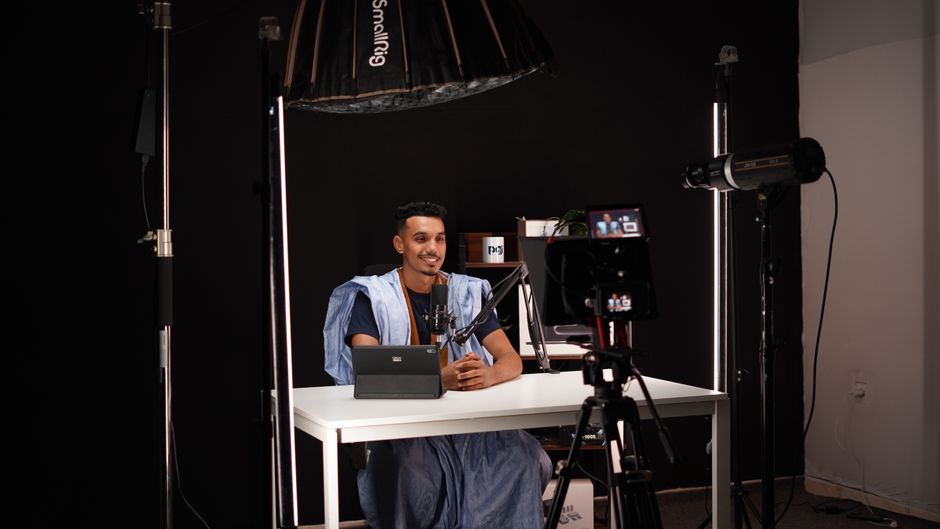
    A creator in a studio setting filming a high-quality vertical video - most popular short-form content platforms

  • The Complete Guide to Social Media Management

    The Complete Guide to Social Media Management

    The Complete Guide to Social Media Management

    Introduction

    (The intro provided in the prompt is already included at the start of this guide.)

    The 5 Pillars of Social Media Management

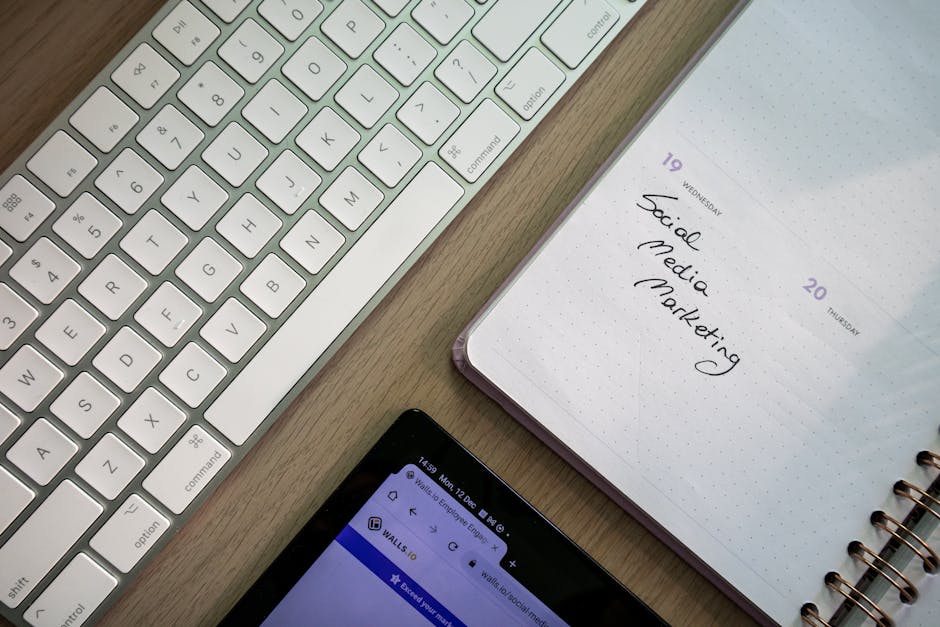
    content calendar for social media management - social media management

    Effective social media management isn’t just about posting when you feel inspired; it’s a disciplined practice built on five core pillars. Without these, your social presence is just noise. At Canatos Media, we focus on an integrated strategy that connects these pillars to your overall business goals.

    1. Content Creation: This is the engine of your social presence. In 2026, content must be “thumb-stopping.” This includes high-quality photography, graphic design, and, most importantly, cinematic short-form video.
    2. Scheduling & Publishing: Consistency is the heartbeat of growth. Using tools to plan your content weeks in advance ensures you never have a “dark” profile. It also allows you to post at optimal times when your specific audience in the tri-state area is most active.
    3. Community Management: Social media is a two-way street. This pillar involves replying to DMs, answering comments, and engaging with your followers’ content. 73% of users say that if a brand doesn’t respond, they’ll buy from a competitor.
    4. Social Listening: This is the “research” phase. It involves monitoring untagged mentions of your brand, tracking competitor moves, and keeping a pulse on industry trends to see what people are actually saying behind your back (in a good way!).
    5. Analytics & Reporting: You cannot manage what you do not measure. By reviewing data, you can see which posts drove the most website visits or leads, allowing you to double down on what works and cut what doesn’t.

    Social Media Management vs. Social Media Marketing

    While often used interchangeably, these are two distinct functions that must work in harmony. Think of social media marketing as the “Big Picture” and social media management as the “Daily Execution.”

    Social media marketing focuses on the strategy, high-level objectives, and often the paid advertising side of things. It asks, “What are our goals for this quarter?” and “How much should we spend on Meta ads?” For those looking to dive deeper into the marketing side, a Social Media Marketing Short-Term Certificate can provide a solid foundation in these strategic concepts.

    On the flip side, social media management is about the day-to-day. It’s the manager who ensures the posts go live, the comments get answered, and the brand voice remains consistent. One sets the destination; the other drives the car.

    How AI Is Transforming Social Media Management

    By May 2026, AI has moved from a “cool toy” to an essential “creative intern.” Today, 97% of marketing leaders say it’s crucial for their teams to know how to use AI in their daily workflows.

    We use AI not to replace the human touch, but to augment it. AI excels at:

    • Sentiment Analysis: Quickly scanning thousands of comments to see if the overall “vibe” is positive or negative.
    • Automated Replies: Handling basic customer service FAQs so human managers can focus on complex, high-emotion interactions.
    • Trendspotting: Identifying a rising trend in the Long Island area before it goes mainstream, giving our clients a first-mover advantage.
    • Content Brainstorming: Helping to rewrite a single caption into five different versions tailored for LinkedIn, TikTok, and Instagram.

    Essential Skills and Tools for 2026

    digital marketing team collaborating on social media strategy - social media management

    To succeed today, a social media manager needs more than just a smartphone and a “good eye.” They need a blend of creative flair and technical proficiency. About 94% of social pros now feel they need to be “chronically online” to effectively trendspot and keep a pulse on audience shifts.

    Core Competencies for Managers

    • Content Curation & Creation: The ability to spot what’s relevant and create high-quality assets.
    • Audience Research: Knowing exactly who the “Long Island customer” is and what they care about.
    • Crisis Management: Knowing how to handle a PR fire before it spreads.
    • Data Analysis: Moving beyond “likes” to understand conversion rates and ROI.

    Managing all of this manually is impossible for a growing business. That’s why we utilize All-in-One Social Content and Management systems. These unified dashboards allow us to see every notification, schedule every post, and pull every report from a single screen. Tools like Sprout Social and Buffer are industry leaders for a reason—they bring order to the chaos of managing 10+ platforms simultaneously.

    Strategies for Growth and Engagement

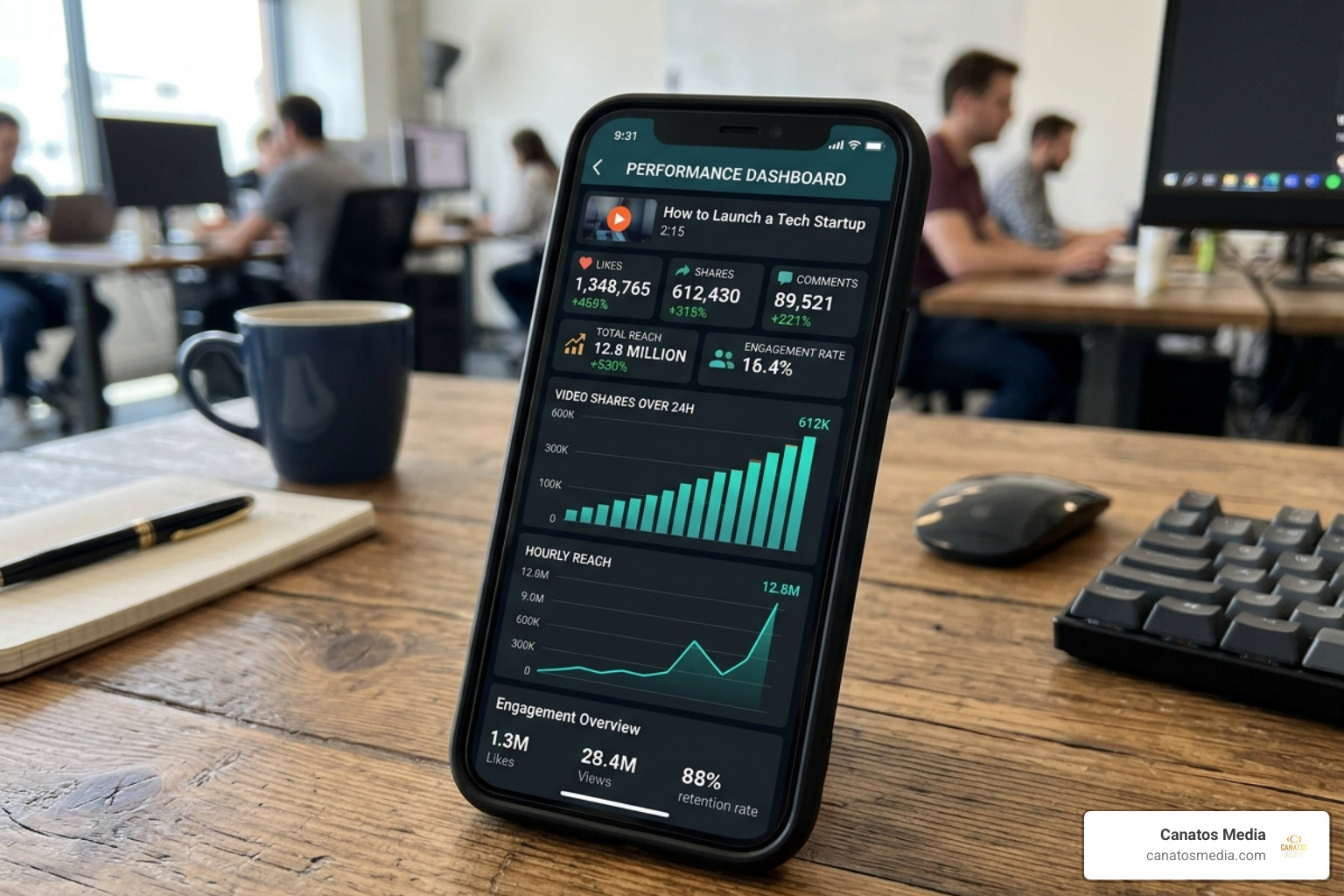
    viral video metrics showing high engagement and reach - social media management

    If you want to grow in 2026, you have to play by the algorithms’ rules. Currently, short-form video (Reels and TikTok) is king, driving 2 to 8 times more engagement than static images.

    But engagement isn’t just about numbers; it’s about community. When a brand responds to a customer, it builds a bond. In fact, nearly three-quarters of consumers expect a response within 24 hours. If you want to see how social fits into the bigger picture of sales, check out our guide on the All-in-One Marketing Funnel.

    • Centralized Command Centers: Brands are moving away from scattered tools and toward “all-in-one” platforms to reduce reporting time and increase efficiency.
    • Social Commerce: The “Shop” button is no longer a luxury; it’s a necessity. Platforms are now full-funnel experiences where users discover, research, and buy without ever leaving the app.
    • The Creator Economy: Authentic storytelling via influencers and creators is replacing traditional “polished” brand ads.
    • Private Messaging: Much of the “social” part of social media has moved to DMs and private groups. Brands that master “conversational commerce” will win.

    Measuring Success and Proving ROI

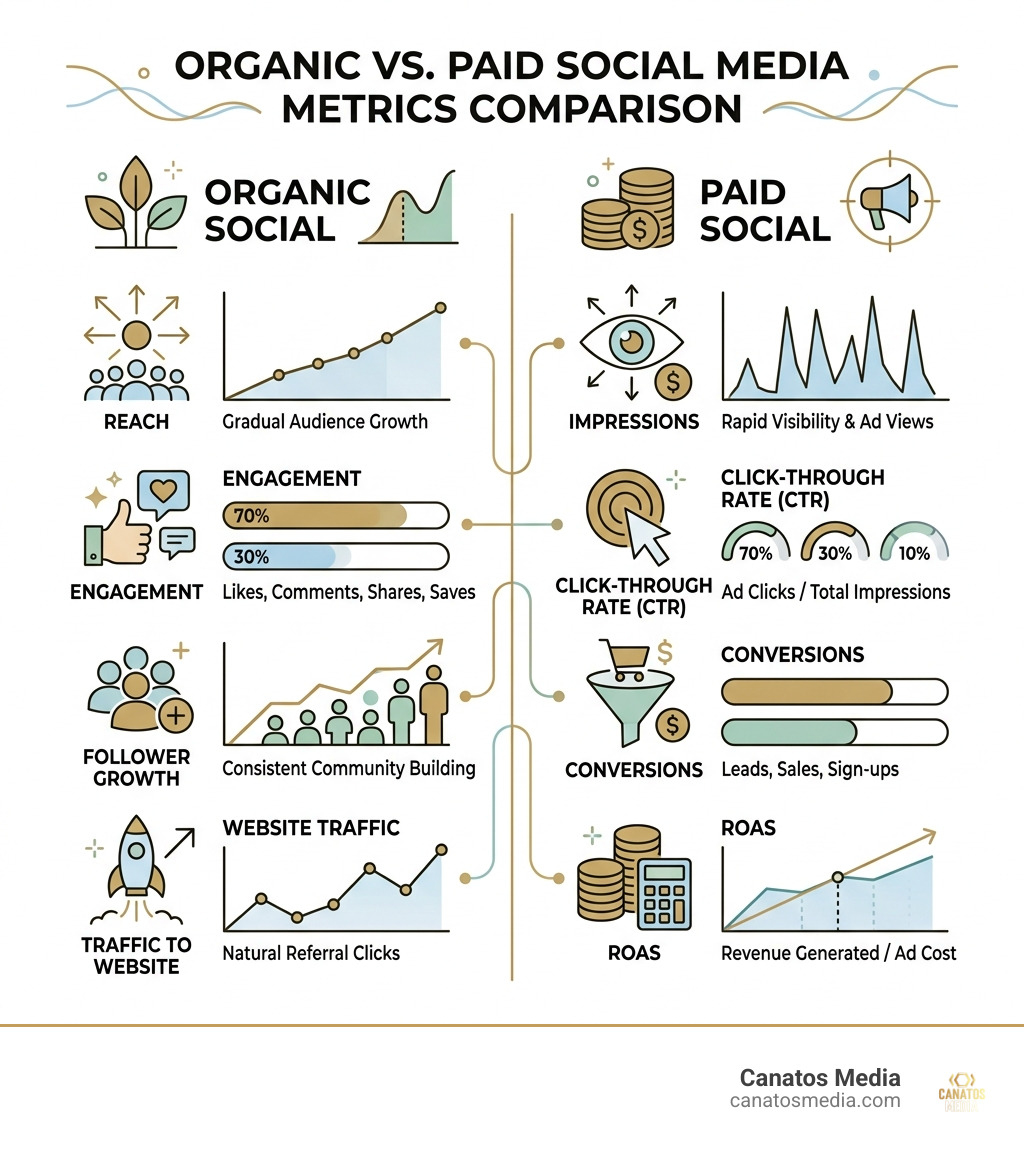
    infographic comparing organic vs paid social media metrics - social media management infographic

    At the end of the day, your business needs to see a return. Whether you are a local shop on Long Island or a tri-state enterprise, you need to know: Is this making us money?

    Leading brands using advanced social media management platforms have reported a 327% ROI according to Forrester Consulting. This isn’t magic; it’s the result of tracking the right Key Performance Indicators (KPIs).

    Key Performance Indicators

    • Engagement Rate: Are people actually interacting, or just scrolling past?
    • Click-Through Rate (CTR): How many people are clicking from your post to your website?
    • Customer Acquisition Cost (CAC): How much does it cost us in content and management to get one new customer?
    • Response Time: How fast are we helping our customers?
    • Share of Voice: How much of the “online conversation” in your industry do you own compared to your competitors?

    For those looking to accelerate these results, combining organic management with Paid Social Media Advertising from Zero to Hero in One Hour is the fastest way to scale.

    Frequently Asked Questions

    How much time does social media management typically take?

    If you’re doing it right, it’s a full-time job. Between content creation, community management, and daily monitoring, it can easily take 20-40 hours a week. However, with “batch scheduling” and automation tools, a business owner might spend 1-2 hours a day on basic maintenance—but they will likely miss out on the deeper growth that comes from professional oversight.

    Should businesses hire a manager or handle it in-house?

    It depends on your scale. Small, local businesses often start in-house to save costs. However, as you grow, the “opportunity cost” of a business owner spending 10 hours a week on Instagram becomes too high. Hiring an agency provides you with a team of experts (videographers, copywriters, and analysts) for often less than the cost of one full-time senior employee. This allows for better scalability and a more professional brand image.

    What are common mistakes to avoid?

    1. Blind Trend-Jumping: Don’t do a “dance” just because it’s trending if it doesn’t fit your brand voice. It looks forced and confuses your audience.
    2. Ignoring Comments: This is the fastest way to kill your reach. The algorithm loves conversation; if you don’t talk back, it stops showing your content.
    3. Generic AI Copy: We’ve all seen it—the “In the ever-evolving landscape of…” captions. AI should be your draft, not your final post. Always add human personality.
    4. Inconsistent Posting: Posting five times in one week and then disappearing for a month tells the algorithm (and your customers) that you aren’t reliable.

    Conclusion

    Social media management in 2026 is no longer a “side task” for an intern; it is a business-critical function. It requires a blend of cinematic storytelling, rapid customer service, and deep data analysis.

    At Canatos Media, we specialize in this integrated approach. We don’t just post; we create cinematic short-form videos that capture attention, manage your community to build trust, and run paid ads to ensure your content reaches the right people in the tri-state area.

    Ready to turn your social media into a growth engine? Explore our All-in-One Social Content and Management services and let’s start building your brand’s future today.

  • Stop the Scroll and Start the Toll with Meta Paid Ads

    Stop the Scroll and Start the Toll with Meta Paid Ads

    Stop the Scroll and Start the Toll with Meta Paid Ads

    Why Meta Pay Ads Can Make or Break Your Ad Budget

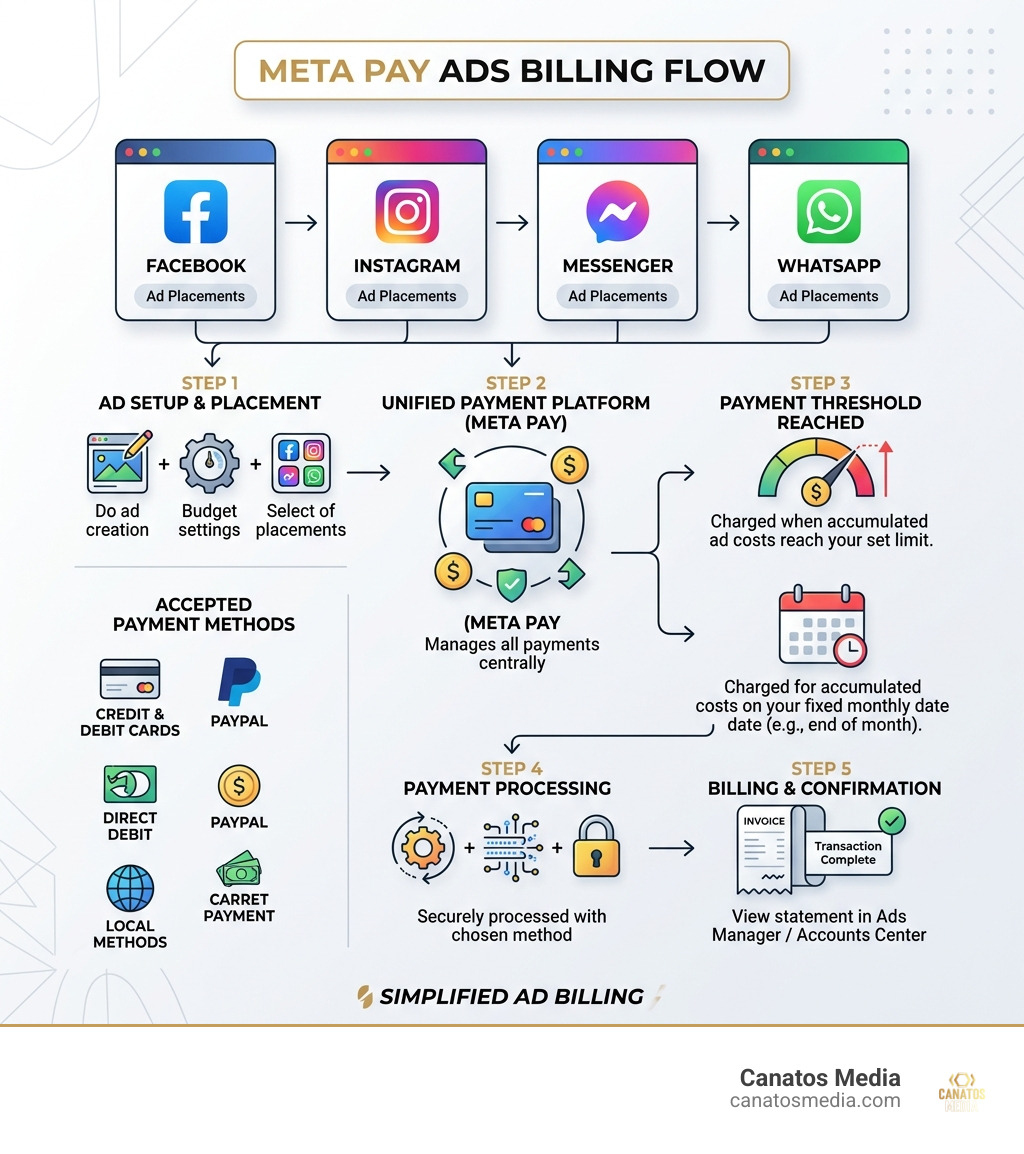
    Meta pay ads is the billing system Meta uses to charge you for advertising across Facebook, Instagram, Messenger, and WhatsApp — all managed through a single unified payment platform.

    Here is what you need to know at a glance:

    Topic Quick Answer
    What is Meta Pay? Meta’s unified payment platform for ad billing across its apps
    How does billing work? Automatic charges at a payment threshold or on your monthly bill date
    What payment methods are accepted? Credit/debit cards, PayPal, direct debit, and local methods depending on your country
    Where do you manage payments? Meta Ads Manager or Accounts Center
    What if you see an unknown charge? Contact your bank, verify with Meta, and dispute if fraudulent

    Every dollar you spend on Meta ads flows through this system. And if you don’t understand how it works, you can end up with surprise charges, disabled accounts, or worse — money wasted on ads that never even ran.

    With over 3.58 billion daily active users across Meta’s apps as of December 2025, the platform is one of the most powerful advertising tools on the planet. But that power comes with a billing setup that confuses a lot of business owners.

    This guide breaks it all down — simply and clearly.

    I’m Nic Canobbio, and through my work leading Canatos Media and overseeing large-scale media and content strategies, I’ve navigated meta pay ads billing — from managing ad spend across multiple campaigns to negotiating deals that depend on clean, uninterrupted ad delivery. That hands-on experience is exactly what shapes the practical guidance you’ll find here.

    Infographic showing Meta Pay ads billing flow across Facebook, Instagram, Messenger, and WhatsApp with payment method types

    Decoding Your Bank Statement: What are Meta Pay Ads Charges?

    We’ve all been there. You’re sipping your morning coffee in Long Island, scrolling through your business bank statement, and you see it: a charge that looks like a cat walked across a keyboard. Something like METAPAY*ADS or FACEBOOK*ADS followed by a string of numbers.

    Before you call the fraud department, let’s decode that jargon. These descriptors are how Meta identifies the money it pulls for your campaigns. Because Meta Platforms, Inc. owns everything from Instagram to WhatsApp, they use a unified billing system. Meta Pay is the platform that handles these transactions.

    Usually, the charge includes a “tag” or a phone number. This is meant to help you trace the transaction back to a specific ad account. If you see “METAPAY,” it means the transaction was processed through the unified wallet system. Given that Meta had about 3.58 billion average daily users in late 2025, the sheer volume of transactions they process is staggering. In fact, third-party payment processors like Slash now power about 1% of all Meta ad spend globally.

    If you are running a local business in the tri-state area, keeping your statement clean is vital for tax season. If you see a charge you don’t recognize, don’t panic. Sometimes it’s just a pre-authorization “ping” to make sure your card is active, or a delayed charge from a campaign that ended a few days ago. However, if you’re serious about scaling, you need to move from “accidental spender” to “strategic investor.” You can learn more about paid social strategy to ensure every charge on that statement is actually driving ROI.

    A business owner looking at a credit card statement with "METAPAY*ADS" highlighted - meta pay ads

    Step-by-Step: Adding a Payment Method for Meta Pay Ads

    Setting up your meta pay ads wallet is the first step toward going live. Meta is quite picky about how you pay, and they’ve been moving toward more secure, verified methods recently.

    Here is how we recommend adding your payment method to ensure your ads don’t get paused at the worst possible moment:

    1. Access the Accounts Centre: On your computer, click your profile picture > Settings & privacy > Settings. From there, navigate to the Accounts Centre.
    2. Navigate to Meta Pay: Look for the “Meta Pay” or “Payments” section. This is your central hub for everything money-related.
    3. Add Your Card: Click “Add debit or credit card.” Meta accepts most major players: Amex, Discover, Mastercard, and Visa.
    4. Set a Default: If you have multiple cards (maybe a backup for when your primary hits its limit), select your preferred card and toggle “Set as default.”
    5. Verification: Meta might send a small temporary charge to verify the card. Don’t worry, it disappears faster than a viral trend.

    If you ever need to swap cards or remove an old one, the process is the same. Just click next to the card and select “Remove card.” For a full list of what’s accepted based on your specific setup, you can check the Accepted payment options for Meta ads page.

    Managing Your Unified Wallet

    One of the coolest (and sometimes most confusing) things about meta pay ads is that it’s a “unified wallet.” This means the payment method you save for Facebook can also be used for your Instagram ads and even Horizon apps.

    This centralized management is great for security. Instead of entering your credit card info into five different apps, you do it once. Meta Pay uses anti-fraud technology and encrypted card storage to keep your data safe. We always suggest our clients in the tri-state area set up a personalized PIN or use biometrics (like FaceID) for their Meta Pay transactions. It adds an extra layer of “no one is spending my money but me.”

    Meta doesn’t usually bill you the second your ad starts running. Instead, they use a system of “thresholds” and “bill dates.” Think of it like a utility bill, but for attention.

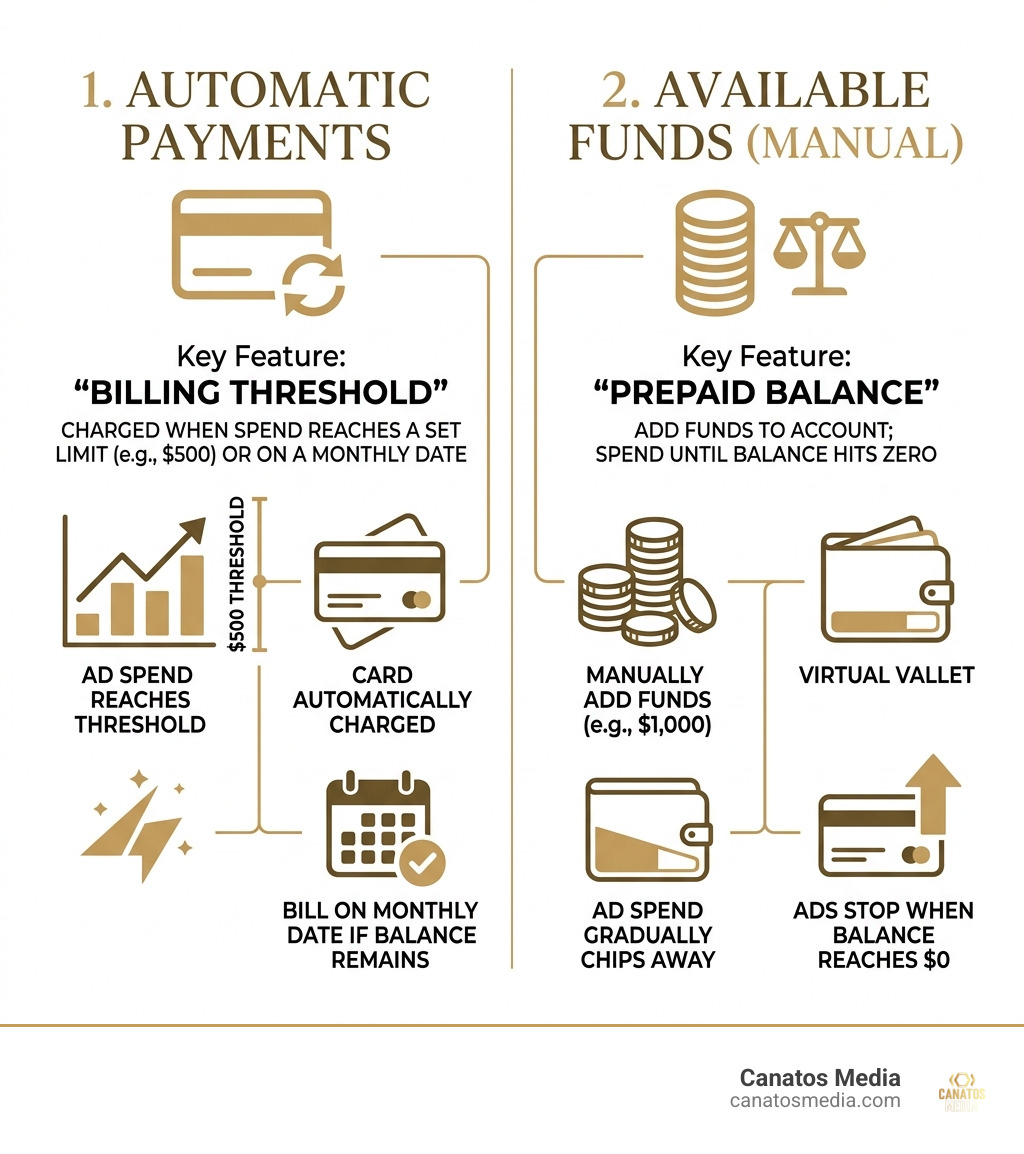
    There are two main ways meta pay ads are billed:

    1. Automatic Payments: This is the most common. Meta gives you a “payment threshold” (e.g., $500). Every time your ad spend reaches $500, Meta charges your card. If you don’t hit that $500 by the end of the month, they charge you on your “monthly bill date” for whatever balance is left.
    2. Available Funds (Manual): This is like a prepaid phone. You add $1,000 to your account, and Meta slowly chips away at it as your ads run. Once the balance hits zero, your ads stop.

    Infographic comparing automatic billing thresholds vs. manual available funds - meta pay ads infographic

    Understanding How Meta Charges for Ads is essential for cash flow management. If you’re a growing business on Long Island, you don’t want five $500 charges hitting your account on the same day if you aren’t prepared for it.

    Troubleshooting Failed Meta Pay Ads Payments

    Nothing kills a campaign faster than a “Payment Failed” notification. When your meta pay ads payment fails, Meta pauses all your ads immediately. If this happens too often, they might even disable your ad account entirely.

    Common reasons for failure include:

    • Insufficient Funds: The most obvious one.
    • Credit Limit Reached: Your bank might have a daily spending limit.
    • Expired Card: You forgot about that new card that came in the mail last month.
    • Bank Block: Sometimes banks see a series of charges from “METAPAY” and flag it as suspicious.

    If your payment fails, go to your Billing settings in Ads Manager. You can usually click “Pay Now” to retry the charge manually. If that doesn’t work, you might need to contact your bank or report an unauthorized Meta Pay charge if you suspect something is fishy.

    Avoiding the 30% Apple Service Fee

    This is a big one that many people miss. If you are boosting a post or setting up ads through the Instagram iOS app, Apple takes a 30% service fee on top of your ad spend.

    Yes, you read that right. If you want to spend $100 on ads, Apple might charge you an extra $30 just for the privilege of using their app to buy them.

    The Pro Tip: Never buy ads through the iOS app. Instead, use a desktop computer and go to adsmanager.facebook.com or instagram.com. By using the web version, you bypass the Apple App Store entirely and keep that 30% in your own pocket. For more details on this, check out the official guide on how to pay for Instagram ads.

    Global Payment Options and Policy Changes

    The world of meta pay ads is constantly shifting. As of April 2026, Meta has implemented some significant policy changes aimed at reducing fraud. Meta projected that in 2024 alone, about 10% of its revenues ($16 billion!) came from ads for fraudulent or banned goods. To combat this, they are getting much stricter.

    For larger advertisers, Meta is moving away from credit cards and mandating monthly invoicing or direct bank debits. This shift requires bank verification, which makes it much harder for scammers to operate. While this might be a headache for those who love their credit card points, it’s a necessary step for platform integrity.

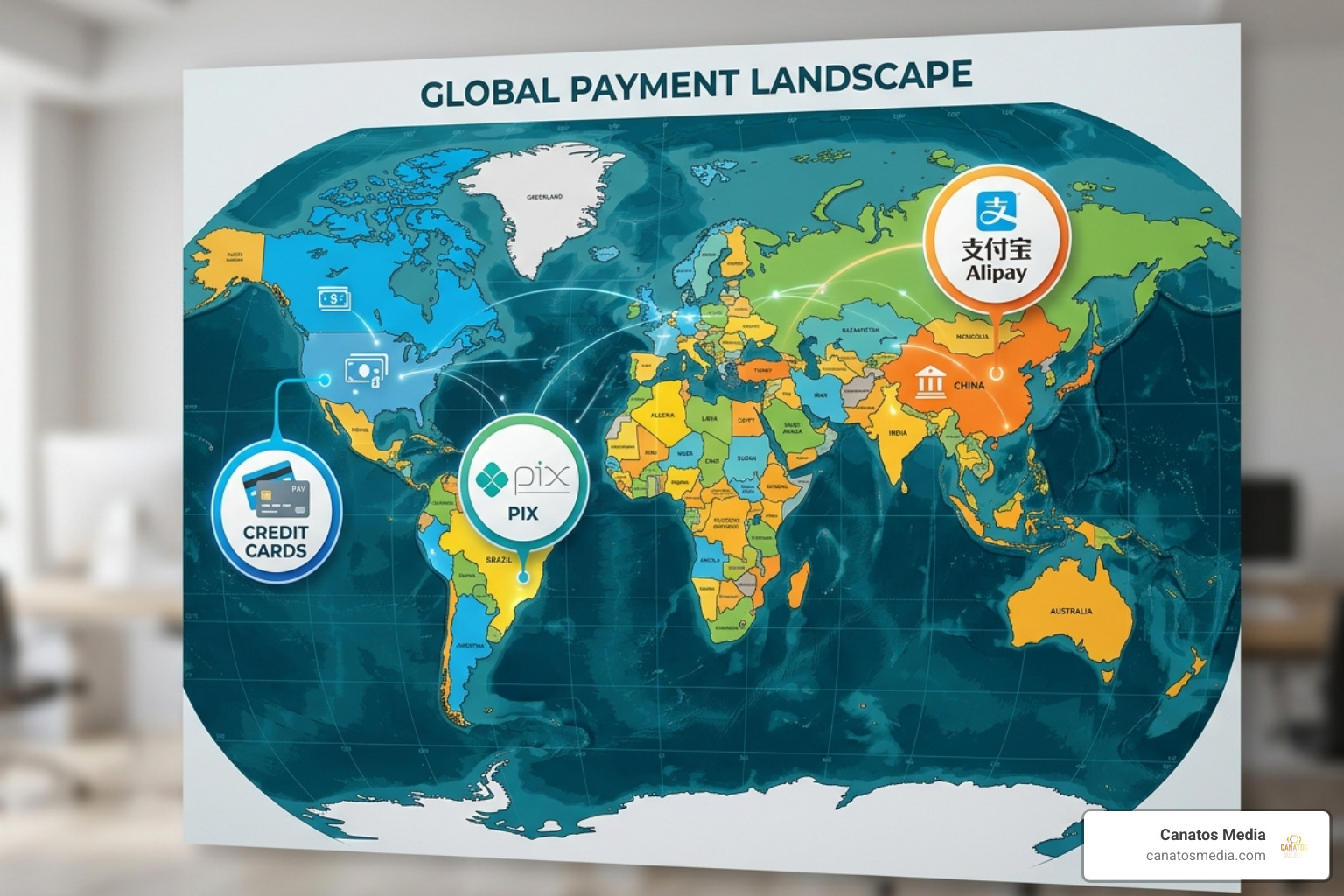
    If you are running campaigns internationally from the tri-state area, you’ll also notice that payment methods vary by country. In Brazil, they use Boleto Bancário; in China, it’s Alipay. But for our local partners, the focus remains on secure, verified US-based banking. Staying ahead of these policy shifts is part of how we build an all-in-one marketing funnel that doesn’t get interrupted by technicalities.

    World map showing various payment methods like PIX, Alipay, and credit cards - meta pay ads

    Advanced Spending Controls and Receipt Management

    We always tell our clients: “Don’t set it and forget it.” Meta gives you several tools to make sure you don’t wake up to a $10,000 bill you didn’t expect.

    • Campaign Spending Limits: You can set a cap on a specific campaign. Once it hits that number, it shuts off.
    • Account Spending Limits: This is your ultimate safety net. You can tell Meta, “Never charge this account more than $5,000 total.” It’s a great way to sleep better at night.
    • Bid Strategies: Instead of just letting Meta spend whatever it wants, you can set “Cost Caps” to ensure you’re only paying what a lead is actually worth to you.

    When it comes to the “boring” stuff like taxes, Meta makes it fairly easy to download your receipts. In the Billing & Payments section of Ads Manager, you can see every single charge, the specific ad it was for, and download a PDF for your accountant. This is also where you ensure you are VAT/GST compliant if you’re doing business across borders.

    Frequently Asked Questions about Meta Billing

    Why do I see a Meta Pay charge I don’t recognize?

    Most of the time, this is either a billing threshold being hit or a delayed charge from a previous campaign. However, since Meta projected $16 billion in fraudulent ad revenue recently, it’s worth being cautious. Check your Ads Manager “Billing” section first. If the charge isn’t there, contact your bank and Meta support immediately.

    How do I switch from automatic to manual payments?

    This is tricky. Usually, the “type” of billing is determined when you first set up the account based on your first payment method. If you start with a credit card, you’re likely on automatic. If you want to switch, you often have to create a new ad account or contact Meta support, though some accounts now allow both.

    What happens if my primary payment method fails?

    Meta will immediately pause all active ads. They will then attempt to charge your secondary (backup) payment method if you have one. If that fails too, your account will stay paused until the balance is settled. Pro tip: Always have a backup card on file to avoid losing your “algorithm momentum.”

    Conclusion

    Navigating meta pay ads doesn’t have to be a headache. Whether you’re decoding a confusing bank statement or trying to avoid that pesky 30% Apple fee, the key is staying informed and staying in control.

    At Canatos Media, we believe that your ad spend should be an investment, not an expense. We specialize in an integrated strategy that connects cinematic short-form content with high-precision targeting and robust conversion tracking. From the tri-state area to Long Island, we help businesses turn “scrolling” into “sales.”

    Ready to stop worrying about billing thresholds and start focusing on growth? Start your professional ad management journey with us today. We’ll handle the “tolls” so you can enjoy the ride.

  • Paid Social Media Advertising: From Zero to Hero in One Hour

    Paid Social Media Advertising: From Zero to Hero in One Hour

    Paid Social Media Advertising: From Zero to Hero in One Hour

    Why Paid Social Media Advertising Is the Fastest Way to Grow Your Business Online

    Paid social media advertising is when businesses pay social platforms — like Facebook, Instagram, TikTok, or LinkedIn — to show their content to a specific, targeted audience, bypassing the algorithm entirely for guaranteed visibility.

    Here’s what it covers at a glance:

    What You Want to Know Quick Answer
    What is it? Paying social platforms to show your ads to a defined audience
    How is it different from organic? Organic relies on the algorithm; paid guarantees reach
    Which platforms? Meta, Instagram, TikTok, LinkedIn, Pinterest, Snapchat, Reddit, YouTube
    What does it cost? As little as $5/day to start; scales with your goals
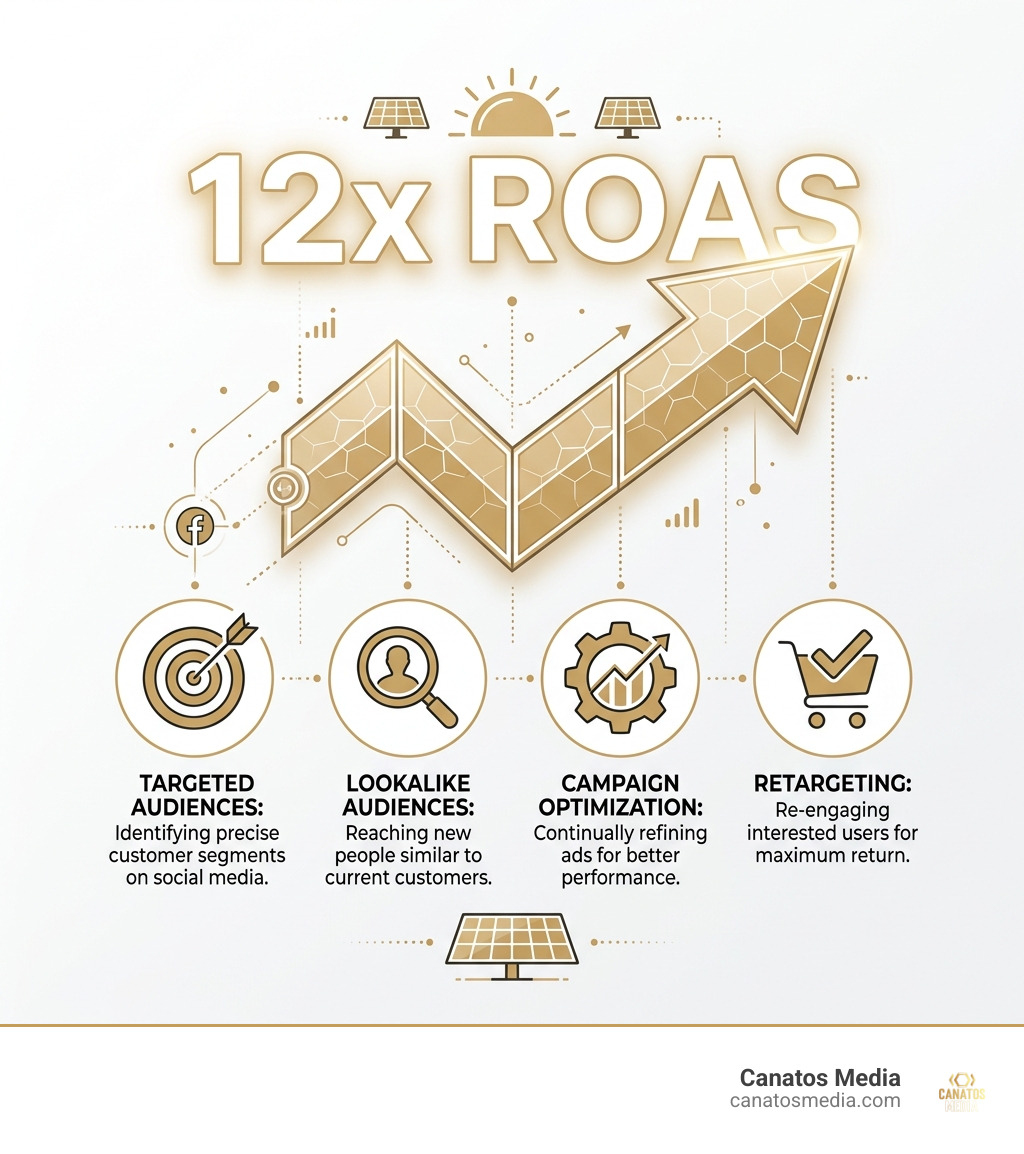
    Does it work? Yes — real campaigns have returned $12–$18 for every $1 spent

    You’ve seen it happen while scrolling. A product appears in your feed that feels almost too relevant. You pause. You click. Sometimes you buy. That’s not a coincidence — that’s a well-targeted paid social ad doing exactly what it was built to do.

    For local business owners trying to stand out, generate leads, and turn attention into real sales, paid social is one of the most powerful tools available today. It’s fast, measurable, and scalable in a way that organic posting simply cannot match.

    I’m Nic Canobbio, founder of Canatos Media, and over two decades of building media strategies and content that has generated over 60 million views, paid social media advertising has been a core lever in driving measurable growth for brands at every stage. In this guide, I’ll walk you from zero to confident — in about an hour.

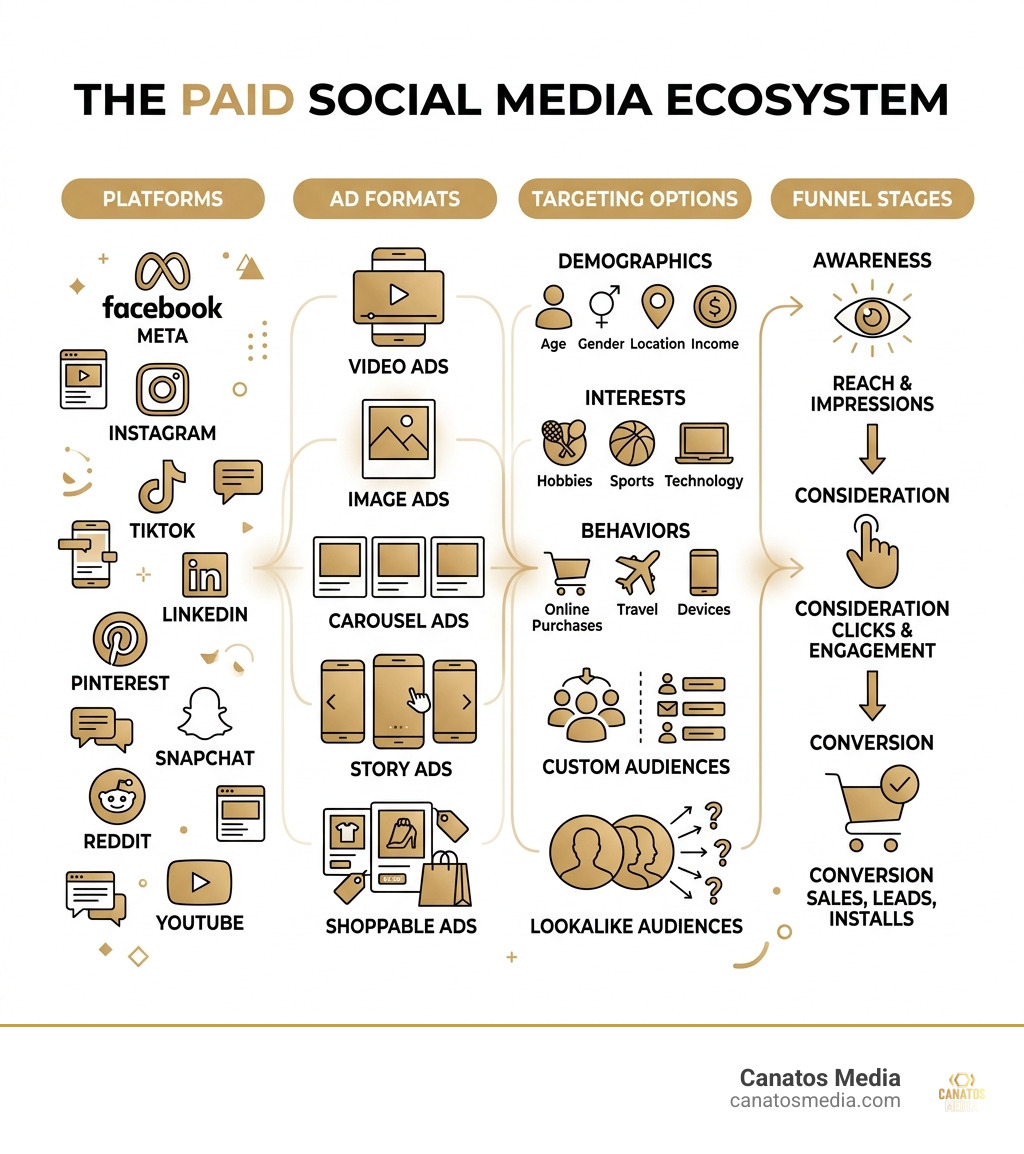
    Infographic showing the paid social media ecosystem: platforms, ad formats, targeting, and funnel stages - paid social media

    What is Paid Social Media Advertising?

    At its simplest, paid social media advertising is the digital equivalent of a billboard, but one that only appears to people who actually care about what you’re selling. Unlike organic social media, which relies on the platform’s algorithm to hopefully show your post to your followers, paid social allows us to pay for a “fast pass” to the front of the line.

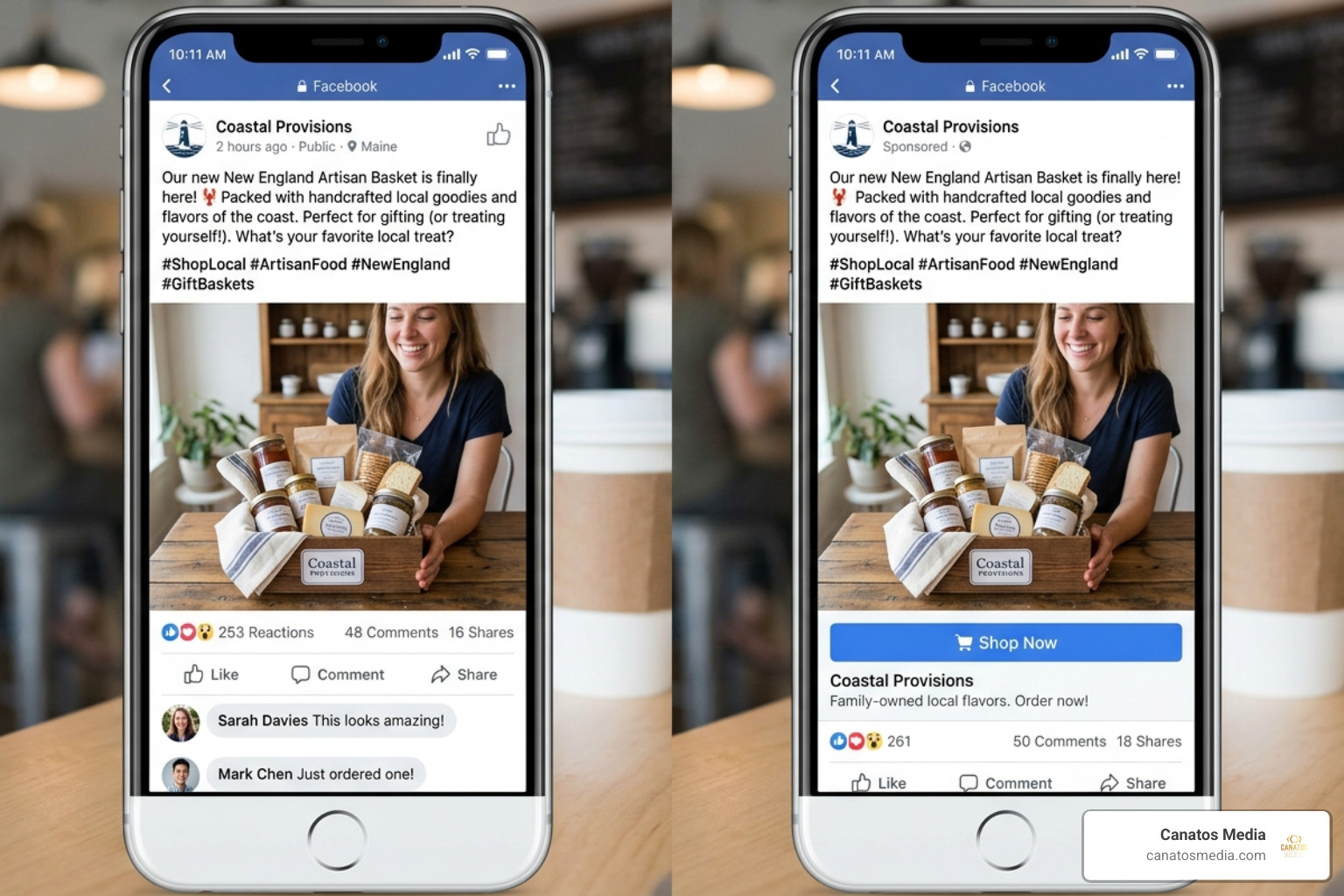
    Comparing a standard organic post vs a sponsored ad with a call to action button - paid social media advertising

    Think of organic social media as a party you’re hosting at your house. You invite your friends (followers), and if they have a good time, they might tell their friends. It’s great for building community and brand “warmth,” but the reach is limited.

    Paid social is like hiring a promotional team to go out into the city and find exactly the type of people who would love your party and hand-delivering them an invitation.

    Feature Organic Social Media Paid Social Media Advertising
    Reach Limited to followers & algorithm whims Guaranteed reach to new audiences
    Targeting Very broad Hyper-specific (interests, behaviors)
    Speed Slow, long-term growth Immediate visibility and results
    Goal Brand awareness & community Leads, sales, and measurable ROI
    Cost “Free” (but takes time/labor) Direct monetary investment

    By using paid social media advertising, we can bypass the “algorithm jail” that often keeps business posts hidden. Instead of shouting into the void, we use precision tools to ensure your message lands in the right hands. For a deeper dive into these fundamentals, check out this Beginner’s Guide to Social Media Advertising.

    The Core Benefits for Businesses in 2026

    In the 2026 digital landscape, the “pay-to-play” model isn’t just an option; it’s a necessity for growth. Here is why we prioritize it for our clients in the Tri-State area and Long Island:

    • Data-Driven ROI: Every dollar spent is tracked. We don’t guess if an ad worked; we see the exact Return on Ad Spend (ROAS).
    • Scalability: If an ad is working, we can simply increase the budget to reach more people. It’s like a volume knob for your revenue.
    • Speed to Market: Want to launch a sale for your Long Island boutique tomorrow? You can have ads running in hours, not weeks.
    • Full-Funnel Support: We can target people who have never heard of you (awareness), people who are comparing options (consideration), and people who left items in their cart (conversion).
    • Precision Control: You decide exactly who sees your ad, when they see it, and how much you’re willing to pay for that interaction.

    Choosing Your Battlefield: Platforms and Ad Formats

    Not all platforms are created equal. If you are a B2B consulting firm, you probably shouldn’t be pouring your entire budget into Snapchat. Conversely, a trendy fashion brand might find its home on TikTok or Instagram.

    At Canatos Media, we believe in an All-in-One Social Content and Management strategy where the content matches the platform’s “vibe.”

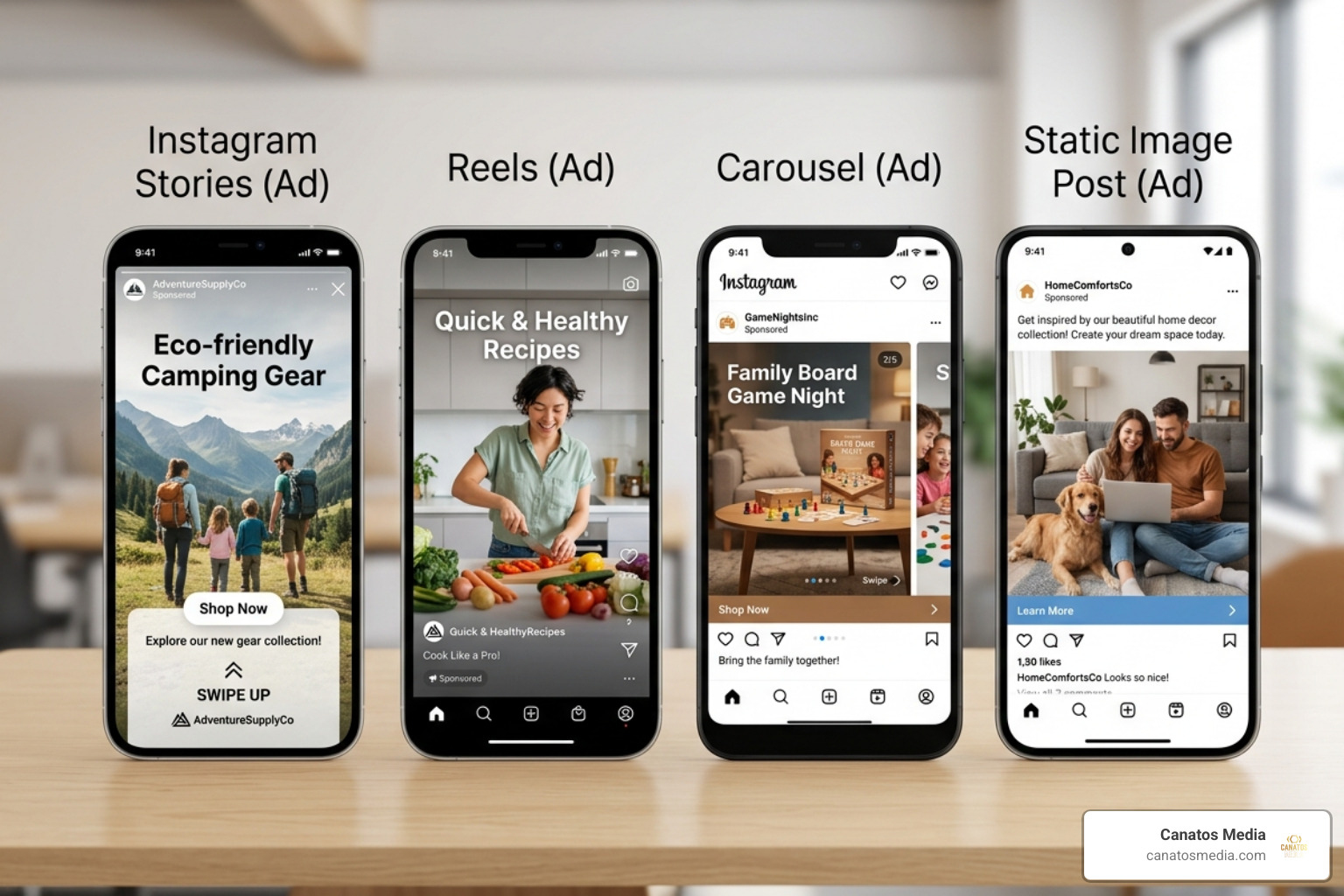
    Comparison of various ad formats including stories, reels, carousels, and static images - paid social media advertising

    Best Platforms for Paid Social Media Advertising

    • Meta (Facebook & Instagram): With over 3 billion active users, Meta remains the heavyweight champion. It offers the most robust targeting tools for both B2B and B2C. Instagram is particularly powerful for visual brands and younger demographics (18–34).
    • LinkedIn: The gold standard for B2B. With over 950 million professionals, we use LinkedIn to target by job title, industry, and even specific company names. It can be more expensive, but the lead quality is often higher.
    • TikTok: No longer just for dancing teenagers. With over 1 billion users, it’s a powerhouse for brand discovery. In fact, 1 in 3 TikTok users has bought a product after seeing it on the platform.
    • YouTube: Ideal for cinematic, long-form storytelling or quick “how-to” ads. Since it’s owned by Google, the search-intent data is incredibly powerful.
    • Pinterest: A “discovery engine” where 70% of the audience is female. It’s perfect for home decor, fashion, and DIY brands.

    For a breakdown of what you might expect to pay on these channels, refer to Facebook and Instagram ads: Budgets, costs and schedules.

    Available Ad Formats for Maximum Engagement

    To stop the scroll, you need the right “vessel” for your message:

    1. Image Ads: Simple, clean, and great for a singular, powerful message.
    2. Video Ads: Cinematic storytelling (our specialty!) that captures attention quickly.
    3. Carousel Ads: Allows users to swipe through multiple products or steps in a process.
    4. Stories & Reels: Full-screen, immersive vertical content that feels native to how people use their phones today.
    5. Boosted Posts: A simple way to give a high-performing organic post more “juice.”

    Building Your Hero Strategy: Goals, Budgets, and Creative

    You wouldn’t build a house without a blueprint, and you shouldn’t run paid social media advertising without a strategy. We help our clients build an All-in-One Marketing Funnel that guides a stranger from “Who are you?” to “Take my money!”

    Setting Effective Budgets and Bidding

    One of the biggest myths is that you need thousands of dollars to start. You don’t. You can start with as little as $5 to $10 a day to test the waters.

    • Daily Budgets: The platform spends a set amount each day. This is great for consistent lead generation.
    • Lifetime Budgets: You set a total amount for a specific date range. The platform’s AI will spend more on days when it sees better opportunities.
    • Advantage+ Optimization: Meta’s AI-driven tool that automatically distributes your budget to the best-performing audiences in real-time.

    Crafting High-Converting Paid Social Media Advertising Creative

    The “creative” (the image or video) is responsible for about 70% of an ad’s success. In 2026, people are blind to traditional commercials. They want content that feels real.

    • Thumb-Stopping Copy: Your first sentence needs to call out your audience’s pain point immediately.
    • User-Generated Content (UGC): Ads that look like a video a friend sent you often perform better than high-gloss studio productions.
    • Mobile-First Design: 83% of social ad spend will be on mobile by 2029. If your ad doesn’t look good on a phone, it doesn’t look good.
    • A/B Testing: We never just run one ad. We test two different headlines or two different videos to see which one the audience prefers.

    Measuring Success and Scaling Your ROI

    If you can’t measure it, you can’t improve it. We move beyond “vanity metrics” like likes or follows and focus on the numbers that actually impact your bank account.

    Key Metrics to Watch

    • ROAS (Return on Ad Spend): If you spend $1 and make $5, your ROAS is 5x. This is the ultimate health metric.
    • CPC (Cost Per Click): How much it costs to get someone to visit your site.
    • CPA (Cost Per Acquisition): How much it costs to actually get a lead or a sale.
    • CTR (Click-Through Rate): The percentage of people who saw your ad and clicked. A high CTR means your creative is engaging.

    Advanced Optimization and Integration

    Once we find a winning ad, we don’t just sit back. We optimize.

    • Retargeting: Have you ever visited a site and then seen their ads everywhere? That’s retargeting. It’s one of the highest-ROI tactics because you’re talking to people who already know you.
    • Lookalike Audiences: We can take your list of current customers and tell the platform, “Find me 2 million more people who look just like these ones.”
    • SEO Synergy: We use top-performing keywords from your SEO strategy in your ad copy to create a unified brand message.

    Frequently Asked Questions about Paid Social

    What is the difference between boosting a post and a full ad campaign?

    Boosting a post is like putting a small megaphone on an existing post. It’s easy, but it has limited targeting. A full ad campaign (via Ads Manager) gives you surgical precision, allowing you to choose specific objectives like “Sales” or “App Installs” and use advanced retargeting.

    How much should a small business spend on paid social in 2026?

    Most small businesses start with $500 to $2,000 per month. However, the “right” amount depends on your goals. We recommend starting small, proving the concept, and then reinvesting your profits to scale.

    Why is my paid social campaign not receiving impressions?

    This is usually due to one of three things: your budget is too low to compete in the auction, your audience targeting is too narrow (aim for at least 2 million for Meta), or your ad has been flagged for violating platform policies.

    Conclusion

    Paid social media advertising is no longer a luxury for big brands — it is the engine that drives growth for local businesses in the Tri-State area and beyond. By combining cinematic content with data-backed targeting, you can turn social media from a time-waster into a revenue-generator.

    At Canatos Media, we don’t just “run ads.” We build integrated strategies that connect your brand’s story to the people who need to hear it most. Whether you’re looking for cinematic video production or a full-funnel All-in-One Social Content and Management partner, we’re here to help you go from zero to hero.

    Ready to see what paid social can do for your business? Let’s build something great together.

    Infographic showing a 12x ROAS achievement for a solar company using paid social - paid social media advertising infographic