
Why Every Business Owner Needs Facebook Business Manager in 2026
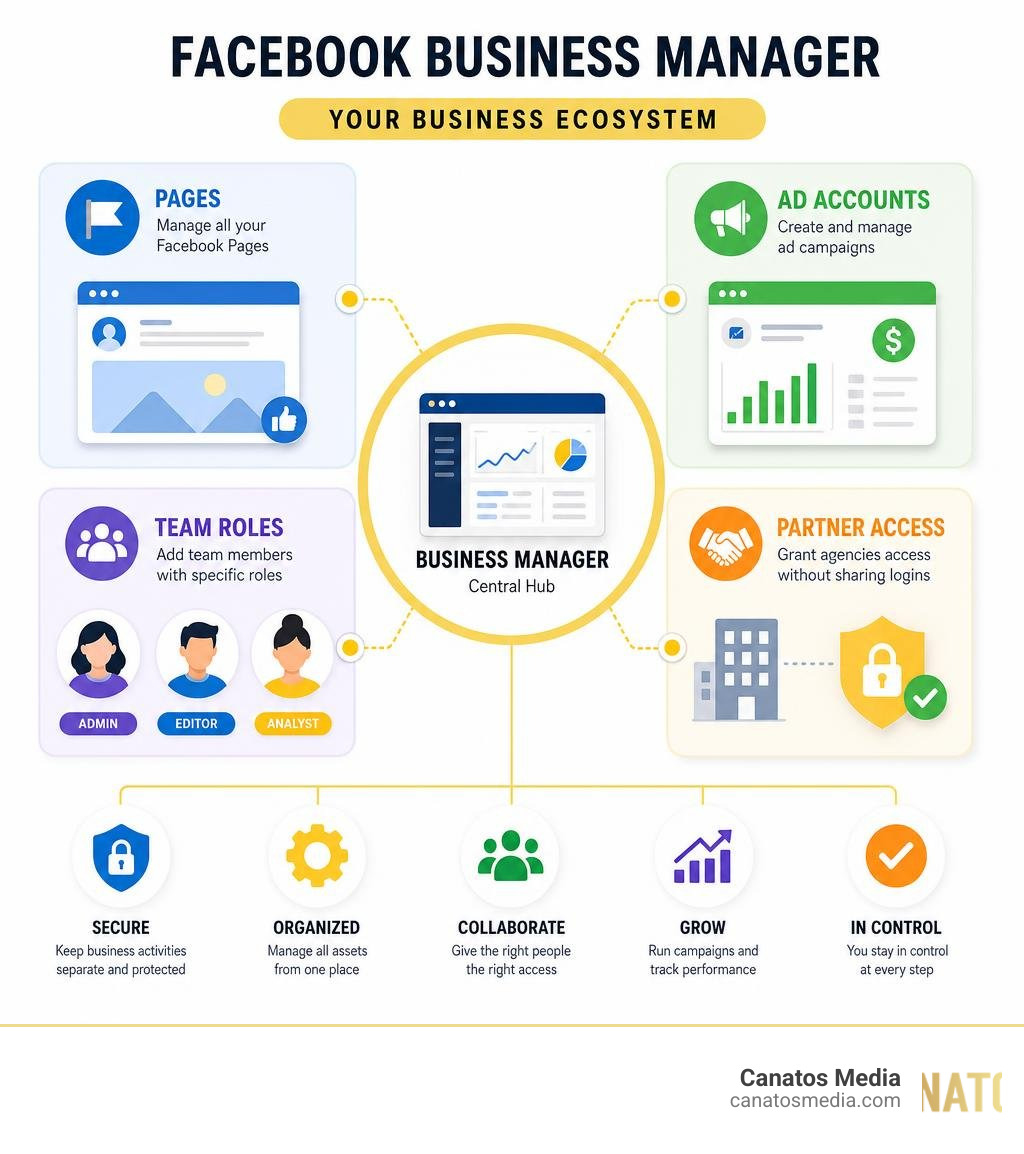
Facebook Business Manager is Meta’s free platform for managing all your business assets — pages, ad accounts, team access, and more — from one secure, centralized dashboard, completely separate from your personal Facebook profile.
Quick answer: What does Facebook Business Manager do?
| Feature | What It Does |
|---|---|
| Asset Management | Manage Pages, ad accounts, and Instagram profiles in one place |
| Team Access | Add employees and agencies with specific permission levels |
| Ad Tools | Create, run, and track paid campaigns across Meta platforms |
| Security | Keep business activities fully separate from personal accounts |
| Partner Sharing | Grant agencies access without sharing your personal login |
If you’re like most local business owners, you’re probably managing your Facebook Page through your personal account right now. Maybe a team member even has your login saved on their phone. It works — until it doesn’t.
Accidental personal posts on your business page. Work notifications blowing up your personal feed at 11pm. A fake “business account” that Facebook’s bots could delete at any time. These are real risks that cost businesses time, money, and credibility every day.
The good news? There’s a smarter way to run things.
I’m Nic Canobbio, founder of Canatos Media, and after managing Facebook Business Manager accounts for brands generating tens of millions of social media views, I’ve seen how this platform separates businesses that scale from those that stay stuck. In the sections below, I’ll walk you through everything you need to get set up and running the right way.
Related content about facebook business manager:
What is Facebook Business Manager and Why Your Business Needs It
For years, many businesses managed their Facebook Pages by logging in through a personal profile or, worse, creating a pseudo “business profile” under a fake name (like “John’s Bakery Profile”). Today in July 2026, those outdated practices are not just inefficient — they are incredibly risky.
First, let’s address the fake accounts. Meta enforces strict policies against pseudo business accounts. Their automated security bots constantly scan the network for fake profiles, and if they catch one, they will permanently delete it. If your business page is tied solely to a fake profile that gets shut down, you could lose access to your page, your custom audiences, and your ad history forever.
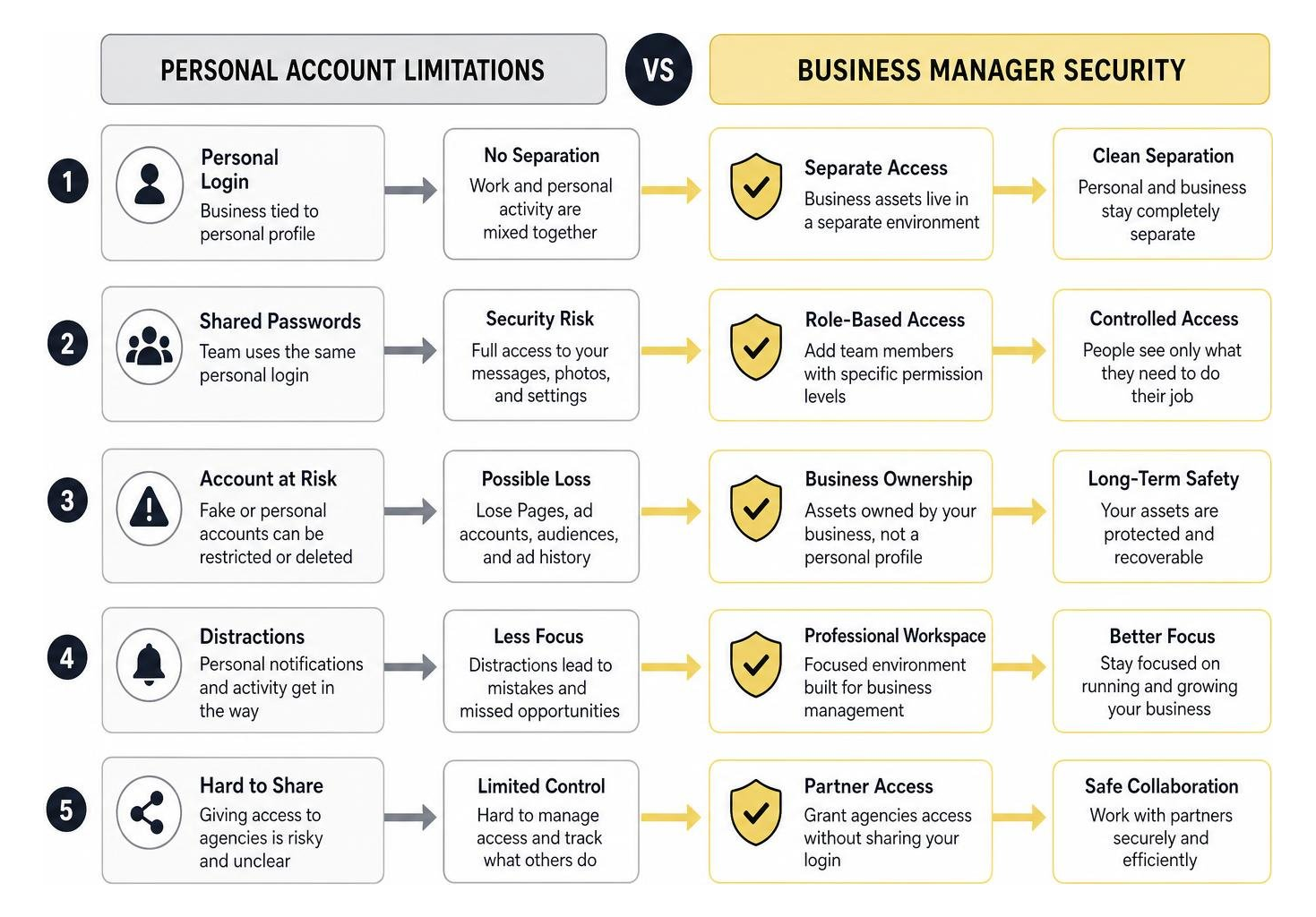
Using a personal profile to manage business assets also creates massive security risks. When you share a personal login with employees or freelancers, you give them full keys to your digital kingdom. They can access your personal messages, photos, and payment methods.
By switching to Facebook Business Manager, you eliminate these issues entirely. The platform acts as an isolated digital command center. It allows you to keep your personal profile completely separate from your business activities. Your team members log in with their own personal Facebook accounts, but they only see the business assets you explicitly grant them permission to view. They will never see your personal profile, and you will never see theirs.
Transitioning to this setup is the first step toward professionalizing your digital footprint. To understand how this fits into your broader social media ecosystem, check out our guide on Meta Business Suite 101: Streamline Your Instagram and Facebook Presence.
Key Benefits of Centralized Meta Asset Management
Running a business in the Tri-State area or on Long Island means keeping up with a competitive market. Managing your digital assets shouldn’t slow you down. Centralizing your assets inside Facebook Business Manager provides three massive advantages:
1. Granular Access Control and Team Collaboration
You no longer have to pass passwords around on sticky notes. With Business Manager, you can assign specific roles (Admin, Employee, or Analyst) to team members. If you hire a new content creator, you can give them access to publish posts on your Page without letting them touch your credit card or edit your ad campaigns.

2. Seamless Agency Partnerships
If you work with an agency for Social Media Management in Long Island or need expert Long Island Social Media Marketing, you don’t need to add individual agency employees to your account. Instead, you can add the agency as a “Partner” using their unique Business ID. This keeps your asset ownership secure while letting their team do what they do best.
3. Professional Security and Privacy
By keeping business notifications confined to the business dashboard, you protect your work-life balance. You won’t get interrupted by customer comments while trying to enjoy dinner with your family. Furthermore, Business Manager provides two-factor authentication requirements for all users, protecting your business from ad account hacks and unauthorized card charges. To explore how professional management can take the weight off your shoulders, read our A-Z Guide to Meta Ads Management Services.
Step-by-Step Guide to Setting Up Your Account
Setting up your command center is straightforward, but it must be done correctly to prevent ownership conflicts down the road.
How to Create Your Facebook Business Manager Account
To ensure a smooth onboarding process, make sure the business owner is the one who initiates this setup. Having an employee create the primary account under their personal login can lead to major headaches if they ever leave the company.
Follow these steps to set up your account:
- Go to the Portal: Open your browser and navigate to business.facebook.com.
- Log In: Click Create Account and log in using your personal Facebook credentials. Don’t worry — this is only to verify your identity; your personal profile details will not be visible to others in the Business Manager.
- Enter Business Details: Input your official business name. This name should match your legal business entity, as Meta may require business verification documents later.
- Enter Your Contact Information: Input your name and your professional work email address. This email is where you will receive all asset notifications and security alerts.
- Complete Onboarding: Follow the remaining prompts to finish setting up your dashboard.
Migrating Existing Pages and Ad Accounts to Facebook Business Manager
Once your account is created, you need to bring your existing assets under this new umbrella.
- Claiming an Existing Facebook Page: If you already own a page, go to Business Settings > Accounts > Pages. Click Add, select Add a Page, and enter your page’s name or URL. Because you are already the admin of that page, the request will approve instantly.
- Requesting Access to a Page: If you are managing a page owned by someone else (like a local partner), select Request Access to a Page instead. This sends a request to the page owner to approve the connection.
- Adding or Creating Ad Accounts: Go to Ad Accounts under the Accounts menu. You can claim an existing ad account or create a brand new one. That once you add an ad account to your Business Manager, it cannot be removed, so only add accounts that your business owns outright.
For a deeper dive into managing these assets once they are migrated, take a look at our guide on How to Navigate Meta Ad Manager Like a Pro.
Advanced Tools for Ad Creation, Tracking, and Mobile Management
Once your assets are migrated into Facebook Business Manager, you gain access to Meta’s most advanced tools. In 2026, Meta has heavily integrated AI-enabled features to make advertising more efficient than ever before.
Within the dashboard, you can build custom audiences, set up the Meta Pixel for website tracking, and deploy sophisticated campaigns. Meta’s automated targeting tools now handle much of the heavy lifting, analyzing user behavior to display your ads to the people most likely to convert.
To make managing your presence easier on the go, Meta provides the Meta Business Suite app. This mobile tool is highly compatible with iOS and Android devices, allowing you to:
- Schedule posts and stories for both Facebook and Instagram simultaneously.
- Manage a unified inbox, responding to comments and direct messages in one place.
- View real-time notifications and to-do lists so you never miss a lead.
- Track key performance insights from your phone.
Using these tools effectively requires understanding how to pair them with high-performing content. For example, learning How Cinematic Short-Form Content Improves Meta Paid Ad Performance can help you stand out in competitive markets like New York and the Tri-State area. If you are just starting out with paid campaigns, our resource on Mastering Meta Business Suite Ads Manager for Beginners is an excellent place to build your skills. You can also take advantage of free courses via Meta Blueprint to earn certifications and sharpen your marketing expertise.
Frequently Asked Questions About Meta Business Tools
Navigating Meta’s business ecosystem can sometimes feel overwhelming. Here are answers to the most common questions we hear from business owners.
What is the difference between Meta Business Suite and Facebook Business Manager?
While they sound similar, they serve different purposes. Facebook Business Manager is the backend settings panel used for managing permissions, billing, ad accounts, pixel data, and partner access. Meta Business Suite is the front-facing management tool designed for day-to-day operations like scheduling content, reading messages, and viewing basic analytics. Think of Business Manager as the engine under the hood, and Business Suite as the dashboard you look at while driving.
Can I run ads without a Facebook Business Manager account?
Technically, yes. You can run ads using a personal ad account or by simply hitting the “Boost Post” button on your page. However, doing this severely limits your capabilities. You miss out on advanced targeting options, custom pixel tracking, detailed audience insights, and professional reporting features. If you want to scale your marketing and avoid wasting budget, setting up a professional Business Manager account is essential. For more on this, read our guide on how to Stop Burning Cash on Bad Meta Ads.
How do I safely add an external agency or partner to my assets?
To add an agency safely, go to your Business Settings, click on Partners, and select Partner to share assets with. You will need to enter the agency’s unique Business ID.
This secure handoff is standard practice for professional agencies and internal team roles alike. In fact, if you look at local job listings, such as Business Manager jobs in Long Island, NY or roles like the Strategic Channel Business Manager (Tri-State) , you will see that proficiency in managing these digital assets and permissions is a highly sought-after professional skill.
Conclusion
Setting up your Facebook Business Manager isn’t just about organizing your digital assets — it is about building a secure, scalable foundation for your business’s growth. By separating your personal life from your professional brand, securing your pages, and unlocking Meta’s advanced advertising tools, you set your business up for long-term success.
At Canatos Media, we specialize in helping businesses across the Tri-State area and Long Island turn these tools into growth engines. We combine cinematic short-form video production, expert social media management, and highly targeted paid ad strategies to drive measurable results.
If you are ready to stop guessing and start scaling your digital presence, we are here to help. Partner with us to build a comprehensive digital strategy that connects stunning content with high-converting ads. Explore our Meta & Google Advertising Services today to see how we can help you dominate your market.